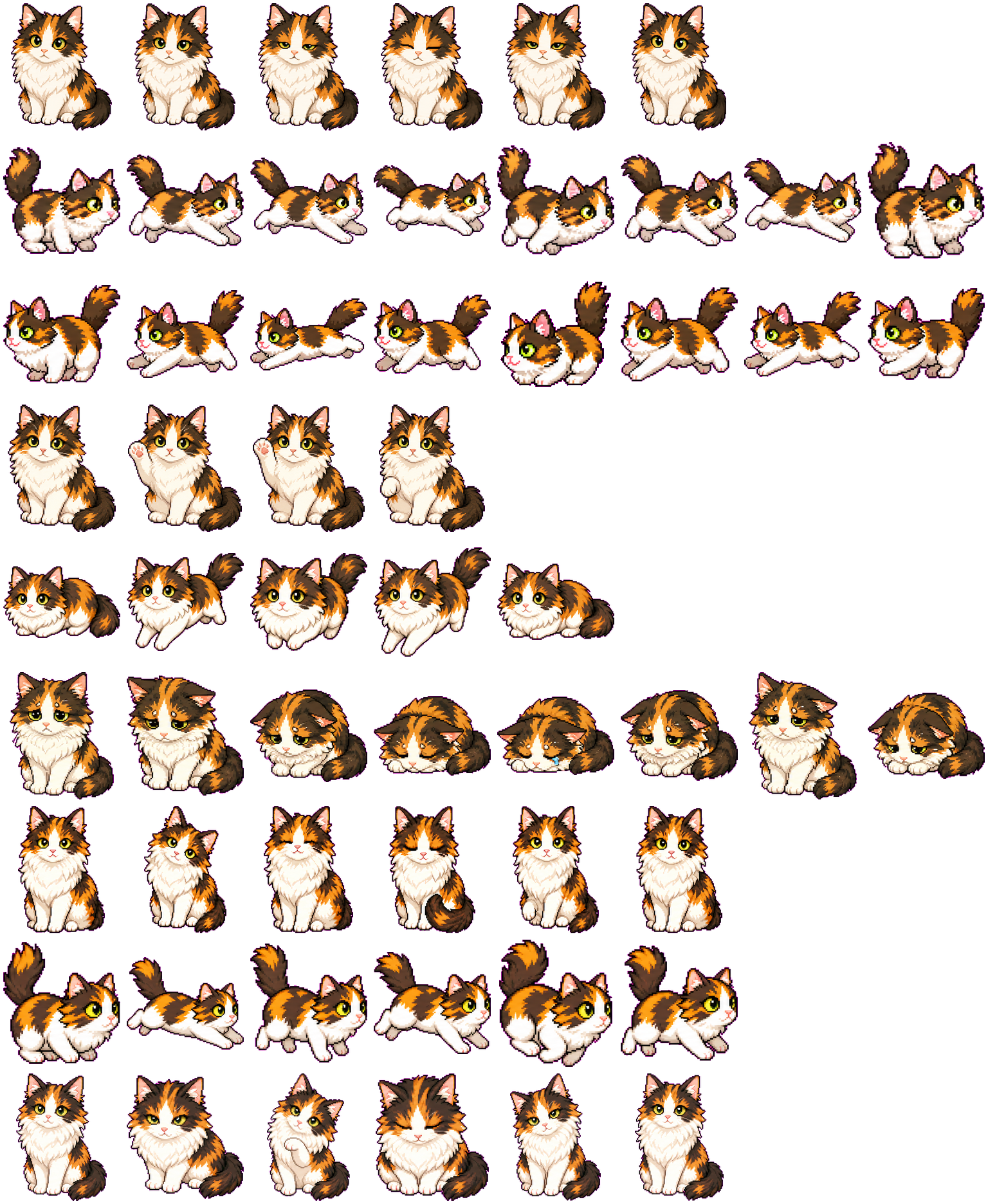

Detailed calico markings
The orange forehead blaze, dark face patches, white muzzle, and full white chest remain consistent across front-facing and side-facing frames.
Codex pet package
Tilly is a detailed long-haired calico cat with orange, black, and white markings, a full chest ruff, green-yellow eyes, and a raised fluffy tail. The atlas moves between composed seated portraits, low running poses, a paw-up wave, and visibly subdued failure frames.
PetWidget + SpriteAnimator
Switch animation rows, tune scale, and test floating behavior before installing this Codex pet locally.
Pet profile
Use these visible package traits to decide whether this pet fits your desktop before you install it.
The orange forehead blaze, dark face patches, white muzzle, and full white chest remain consistent across front-facing and side-facing frames.
Running frames lower and lengthen the body while the tail stays high, separating locomotion from Tilly's upright idle and review poses.
Rounded fur edges and mostly natural coat colors give Tilly a quieter visual profile than the catalog's pixel mascots and fantasy creatures.
Animation review
These observations come from the original package spritesheet, not a generic species description.
Idle frames use small eye and head changes around a stable seated silhouette. Waiting lowers the body and softens the expression without changing the recognizable calico face pattern.
The running rows use a side profile with stretched forelegs and a raised tail. Jumping returns to a front view and lifts one paw, so the action does not look like another run frame.
Failed frames move from a worried sit into a curled, head-down posture. Review restores the upright body and uses smaller face and paw changes for a focused look.
Compare before installing
Compare another calico interpretation with a shorter coat and a more compact pixel-like silhouette.
Compare a softer chibi cat whose rounded body and simpler markings create a more stylized desktop companion.
Compare a cat concept built around a prop and cozy theme instead of natural coat detail.
Package visuals reviewed from the original spritesheet on .
State previews
Use the grid to check whether the shared 8 by 9 atlas has complete idle, movement, waiting, failed, and review animation rows.
Need help?
Not sure how to use this pet in Codex? Copy this AI prompt and ask your assistant to add and enable this existing pet for you.
It installs and enables this pet only. It will not generate a new pet.
Download package
Download the zip package, or copy a community CLI or curl command that installs this Codex pet into $HOME/.codex/pets/tilly. Then enable it with /pet or Settings -> Appearance -> Pets.
npx @eyichan/codexpets add tillypet.json
Save this file as pet.json inside the local package folder for this Codex pet.
{
  "id": "tilly",
  "displayName": "Tilly",
  "description": "A fluffy long-haired calico kitty with a white chest ruff, pink nose, green-yellow eyes, and calm curious expression.",
  "spritesheetPath": "spritesheet.webp"
}
Assets
Atlas
Use the preview controls above to check idle, movement, waiting, failed, and review rows before installing.
# After downloading tilly-codex-pet.zip
mkdir -p "$HOME/.codex/pets/tilly"
unzip -o "./tilly-codex-pet.zip" -d "$HOME/.codex/pets/tilly"

# In Codex
/pet

# Or manually
Settings -> Appearance -> Pets -> choose tilly
Download the package zip first, then run this command from the folder that contains the zip file. After installation, use /pet or open Settings, choose Appearance, then Pets. Use Refresh custom pets if the package does not appear immediately.
How to use
Scan the 9-state preview grid to confirm the spritesheet covers idle, movement, waving, failed, waiting, and review states.
Download the package zip, or save spritesheet.webp and pet.json into a folder named after this pet id.
Copy both files into ~/.codex/pets/<pet-id>/ so Codex can discover the custom pet package.
Use /pet inside Codex, or open Settings -> Appearance -> Pets and choose this installed pet. Refresh custom pets if it is not listed yet.