
Movement versus rest
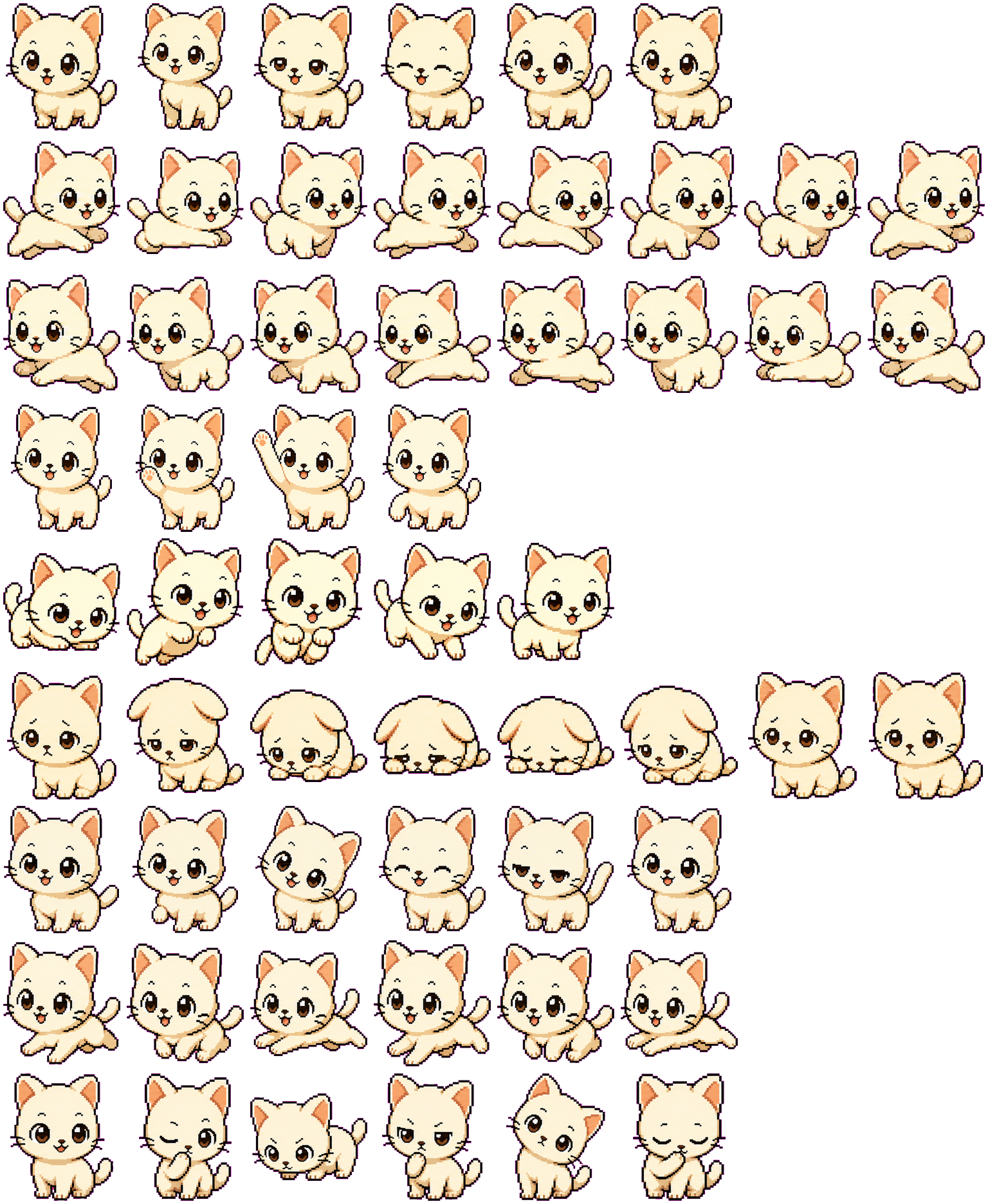
The side-running rows stretch Mochi into a low leap, while idle keeps the paws planted and changes the eyes. This produces a clearer change of activity than the small blink alone.
Codex pet package
A cute chibi cat Codex pet with a soft mochi look, built as a downloadable animated desktop companion.
PetWidget + SpriteAnimator
Switch animation rows, tune scale, and test floating behavior before installing this Codex pet locally.
Loading image. You can edit the URL or reset to cancel.
Before you choose
Mochi suits a light, expressive companion: the cream coat leaves the eyes and pink ear interiors as the main accents. The face stays large even when the body crouches.
The side-running rows stretch Mochi into a low leap, while idle keeps the paws planted and changes the eyes. This produces a clearer change of activity than the small blink alone.
In the failed row, the ears fold downward and the body settles close to the floor. Review uses head tilts and a paw near the mouth instead. Compare those rows at your intended display size so a thoughtful pose is not mistaken for failure.
The pale body has a dark edge, but the cream face and paws can still blend into a pale wallpaper. Preview both your normal background and a dark one; increasing scale helps the facial changes remain visible.
Compare with Siam: Siam has a similar compact cat shape but a dark face mask and bright blue eyes, giving the facial area stronger color separation.
Visual review by Codex Pets Team. Original atlas rows inspected on . How we review pets. These are visual observations, not an installation test or a license grant. Use the state previews below to check your preferred size.
State previews
Use the grid to check the nine standard action rows: idle, movement, waiting, failed, and review.
Need help?
Not sure how to use this pet in Codex? Copy this AI prompt and ask your assistant to add and enable this existing pet for you.
It installs and enables this pet only. It will not generate a new pet.
Download package
Download the zip package, or copy a community CLI or curl command that installs this Codex pet into $HOME/.codex/pets/mochi. Then enable it with /pet or Settings -> Appearance -> Pets.
npx @eyichan/codexpets add mochipet.json
Save this file as pet.json inside the local package folder for this Codex pet.
{
  "id": "mochi",
  "displayName": "Mochi",
  "description": "A cute chibi cat Codex pet with a soft mochi look, built as a downloadable animated desktop companion.",
  "spritesheetPath": "spritesheet.webp"
}
Assets
Atlas
Use the preview controls above to check idle, movement, waiting, failed, and review rows before installing.
# After downloading mochi-codex-pet.zip
mkdir -p "$HOME/.codex/pets/mochi"
unzip -o "./mochi-codex-pet.zip" -d "$HOME/.codex/pets/mochi"

# In Codex
/pet

# Or manually
Settings -> Appearance -> Pets -> choose mochi
Download the package zip first, then run this command from the folder that contains the zip file. After installation, use /pet or open Settings, choose Appearance, then Pets. Use Refresh custom pets if the package does not appear immediately.
How to use
Scan the 9-state preview grid to confirm the spritesheet covers idle, movement, waving, failed, waiting, and review states.
Download the package zip, or save spritesheet.webp and pet.json into a folder named after this pet id.
Copy both files into ~/.codex/pets/<pet-id>/ so Codex can discover the custom pet package.
Use /pet inside Codex, or open Settings -> Appearance -> Pets and choose this installed pet. Refresh custom pets if it is not listed yet.