
A low running stride
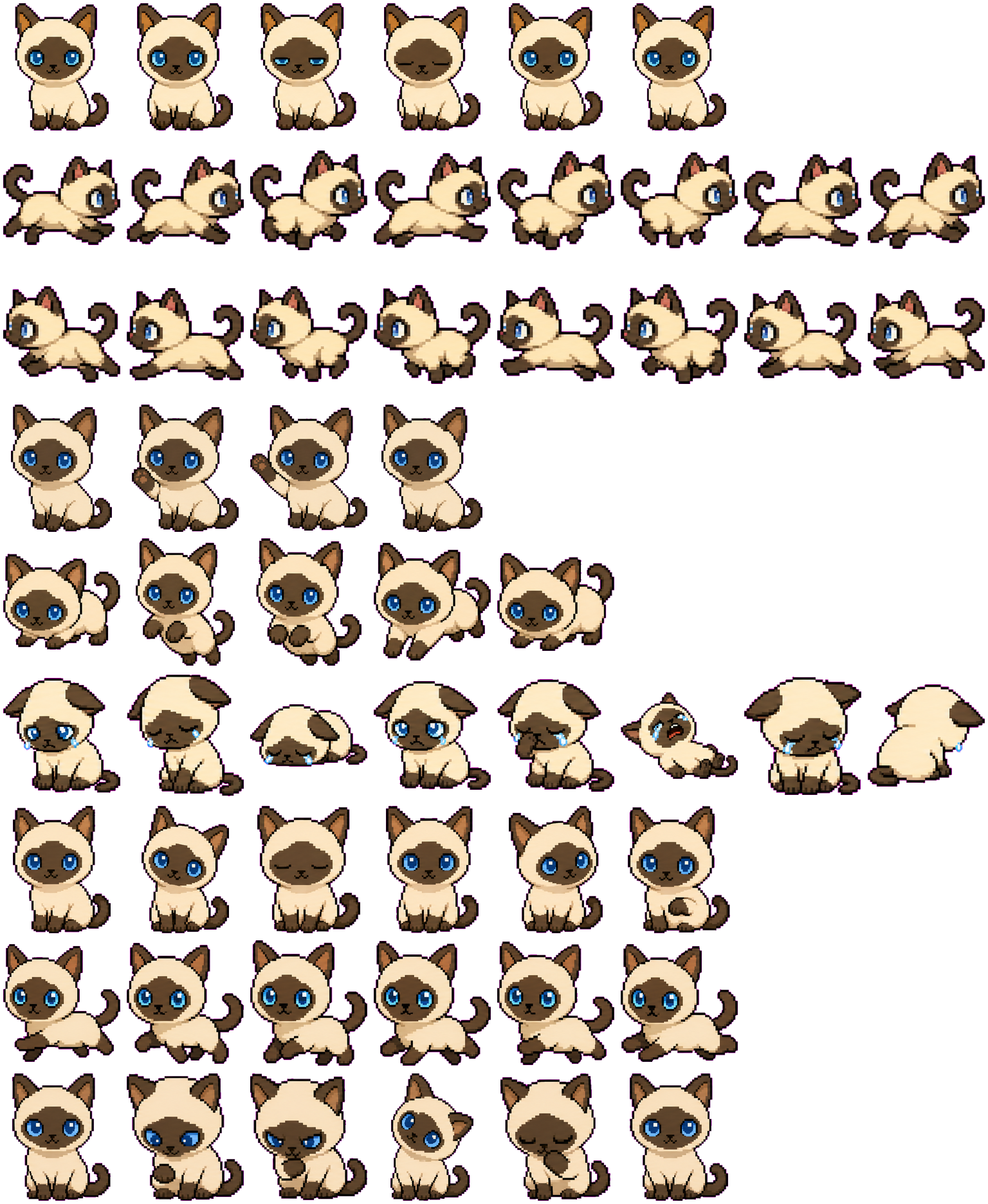
Both directional rows alternate a stretched leap with gathered paws. Jumping is a separate upward sequence with the front paws lifted, so vertical motion has a visibly different silhouette.
Codex pet package
A tiny Siamese cat Codex pet with dark points and bright blue eyes, packaged for animated previews.
PetWidget + SpriteAnimator
Switch animation rows, tune scale, and test floating behavior before installing this Codex pet locally.
Loading image. You can edit the URL or reset to cancel.
Before you choose
Siam combines a cream body with a dark face mask, ears, feet and tail. The blue eyes remain a distinct focal point across the front-facing poses.
Both directional rows alternate a stretched leap with gathered paws. Jumping is a separate upward sequence with the front paws lifted, so vertical motion has a visibly different silhouette.
The failed row includes tears, a low crouch, a side roll and a turned-away pose. It changes the whole body more than waiting, which stays seated and varies the eyes and a raised paw.
Review includes a tilted head and a paw near the face. Inspect it beside failed rather than judging the pet only from idle; the longer failure sequence is much more expressive than the calm default suggests.
Compare with Mochi: Mochi retains a mostly pale face, while Siam's dark mask keeps the eye area visually separate from the cream body.
Visual review by Codex Pets Team. Original atlas rows inspected on . How we review pets. These are visual observations, not an installation test or a license grant. Use the state previews below to check your preferred size.
State previews
Use the grid to check the nine standard action rows: idle, movement, waiting, failed, and review.
Need help?
Not sure how to use this pet in Codex? Copy this AI prompt and ask your assistant to add and enable this existing pet for you.
It installs and enables this pet only. It will not generate a new pet.
Download package
Download the zip package, or copy a community CLI or curl command that installs this Codex pet into $HOME/.codex/pets/siam. Then enable it with /pet or Settings -> Appearance -> Pets.
npx @eyichan/codexpets add siampet.json
Save this file as pet.json inside the local package folder for this Codex pet.
{
  "id": "siam",
  "displayName": "Siam",
  "description": "A tiny Siamese cat Codex pet with dark points and bright blue eyes, packaged for animated previews.",
  "spritesheetPath": "spritesheet.webp"
}
Assets
Atlas
Use the preview controls above to check idle, movement, waiting, failed, and review rows before installing.
# After downloading siam-codex-pet.zip
mkdir -p "$HOME/.codex/pets/siam"
unzip -o "./siam-codex-pet.zip" -d "$HOME/.codex/pets/siam"

# In Codex
/pet

# Or manually
Settings -> Appearance -> Pets -> choose siam
Download the package zip first, then run this command from the folder that contains the zip file. After installation, use /pet or open Settings, choose Appearance, then Pets. Use Refresh custom pets if the package does not appear immediately.
How to use
Scan the 9-state preview grid to confirm the spritesheet covers idle, movement, waving, failed, waiting, and review states.
Download the package zip, or save spritesheet.webp and pet.json into a folder named after this pet id.
Copy both files into ~/.codex/pets/<pet-id>/ so Codex can discover the custom pet package.
Use /pet inside Codex, or open Settings -> Appearance -> Pets and choose this installed pet. Refresh custom pets if it is not listed yet.