
Two characters share one outline
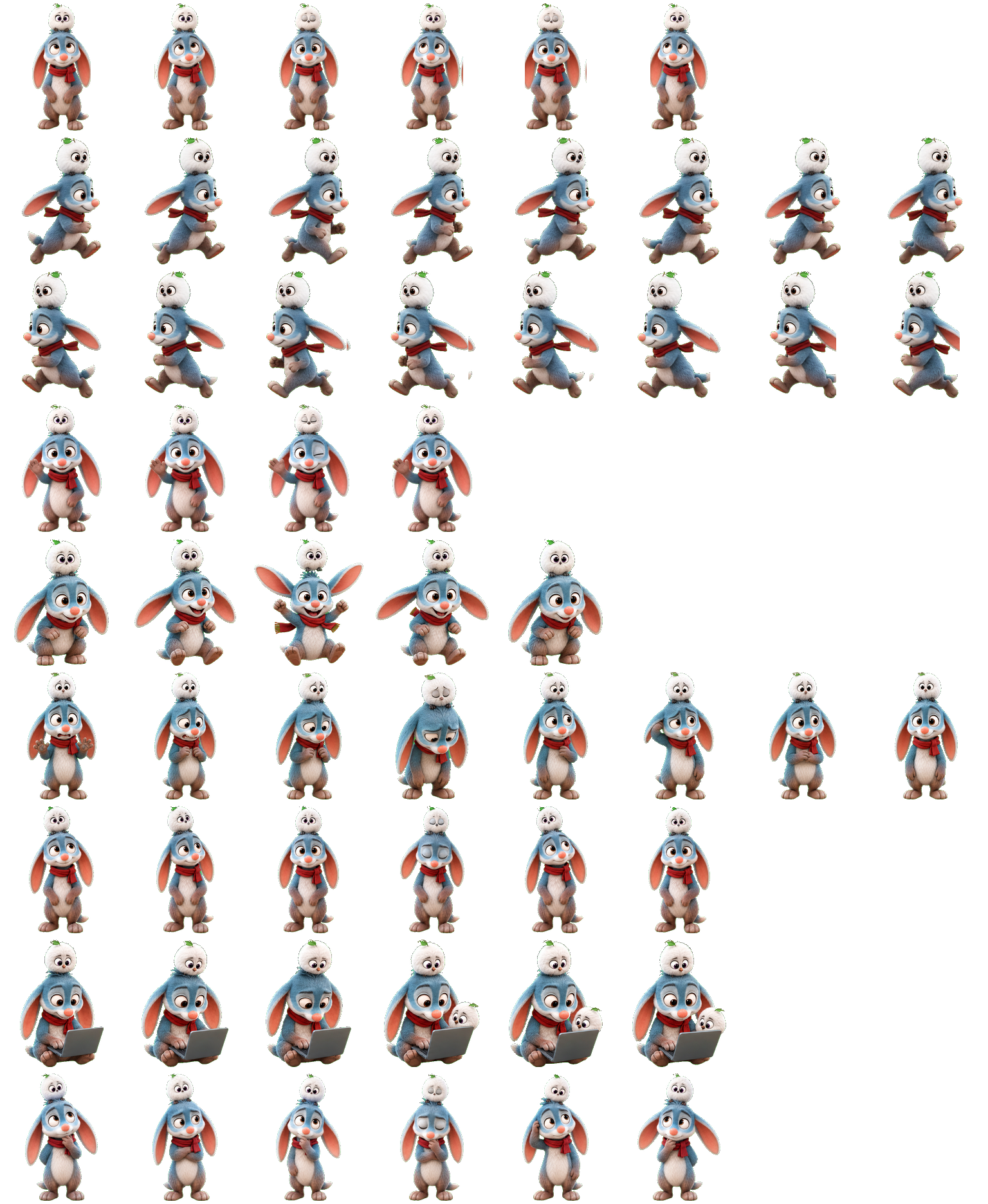
The white bird remains above the head throughout the inspected rows, including directional strides and the jump. The companion never becomes a separate independently moving desktop pet.
Codex pet package
Bilby Bird pairs a blue-gray, long-eared character with a tiny white bird perched above its head. A red scarf provides the clearest color accent. Choose this pair for its upright, two-level silhouette and laptop-working animation; the smaller bird and subtle facial status changes need a closer look at thumbnail size.
PetWidget + SpriteAnimator
Switch animation rows, tune scale, and test floating behavior before installing this Codex pet locally.
Loading image. You can edit the URL or reset to cancel.
Pet profile
Use these visible package traits to decide whether this pet fits your desktop before you install it.
The white bird remains above the head throughout the inspected rows, including directional strides and the jump. The companion never becomes a separate independently moving desktop pet.
The Running row brings out a gray laptop in front of the body. This is a clearer working cue than the small eye and ear changes used in Waiting and Review.
The red scarf and pale face separate from the blue-gray body on both inspected backgrounds. Tiny bird details fade earlier than the long ears and scarf at small scale.
Animation review
These observations come from the original package spritesheet, not a generic species description.
Run-right and run-left turn the whole body into opposite profiles with alternating legs. Jumping spreads the ears and lifts the feet, while Waving keeps the frontal upright stance.
The Failed sequence droops the ears and face but keeps the character standing with the bird perched overhead. Choose a pet with a floor-level collapse if you need a larger failure signal.
Waiting and Review retain the upright body and perched bird. Their small head and paw movements are less obvious than the laptop in Running; inspect both at your intended display size.
Compare before installing
Sloth is a calmer hanging companion with similarly subtle quiet-state changes.
Red Panda gives a broader tail silhouette and a more pronounced lowered failure pose.
Package visuals reviewed from the original spritesheet on . Reviewed by Codex Pets Team. How we review pets. These are visual observations, not an installation test or an artwork license.
State previews
Use the grid to check the nine standard action rows: idle, movement, waiting, failed, and review.
Need help?
Not sure how to use this pet in Codex? Copy this AI prompt and ask your assistant to add and enable this existing pet for you.
It installs and enables this pet only. It will not generate a new pet.
Download package
Download the zip package, or copy a community CLI or curl command that installs this Codex pet into $HOME/.codex/pets/bilby-bird. Then enable it with /pet or Settings -> Pets.
npx @eyichan/codexpets add bilby-birdpet.json
Save this file as pet.json inside the local package folder for this Codex pet.
{
  "id": "bilby-bird",
  "displayName": "Bilby Bird",
  "description": "A blue-gray long-eared Codex pet with a red scarf, a tiny white bird companion and a visible laptop-working pose.",
  "spritesheetPath": "spritesheet.webp"
}
Atlas
Use the preview controls above to check idle, movement, waiting, failed, and review rows before installing.
Assets
# After downloading bilby-bird-codex-pet.zip
mkdir -p "$HOME/.codex/pets/bilby-bird"
unzip -o "./bilby-bird-codex-pet.zip" -d "$HOME/.codex/pets/bilby-bird"

# In Codex
/pet

# Or manually
Settings -> Pets -> choose bilby-bird
Download the package zip first, then run this command from the folder that contains the zip file. After installation, use /pet or open Settings and choose Pets (Mini & pets in some versions). Use Refresh if the package does not appear immediately.
How to use
Scan the 9-state preview grid to confirm the spritesheet covers idle, movement, waving, failed, waiting, and review states.
Download the package zip, or save spritesheet.webp and pet.json into a folder named after this pet id.
Copy both files into ~/.codex/pets/<pet-id>/ so Codex can discover the custom pet package.
Use /pet inside Codex, or open Settings -> Pets and choose this installed pet. Refresh custom pets if it is not listed yet.