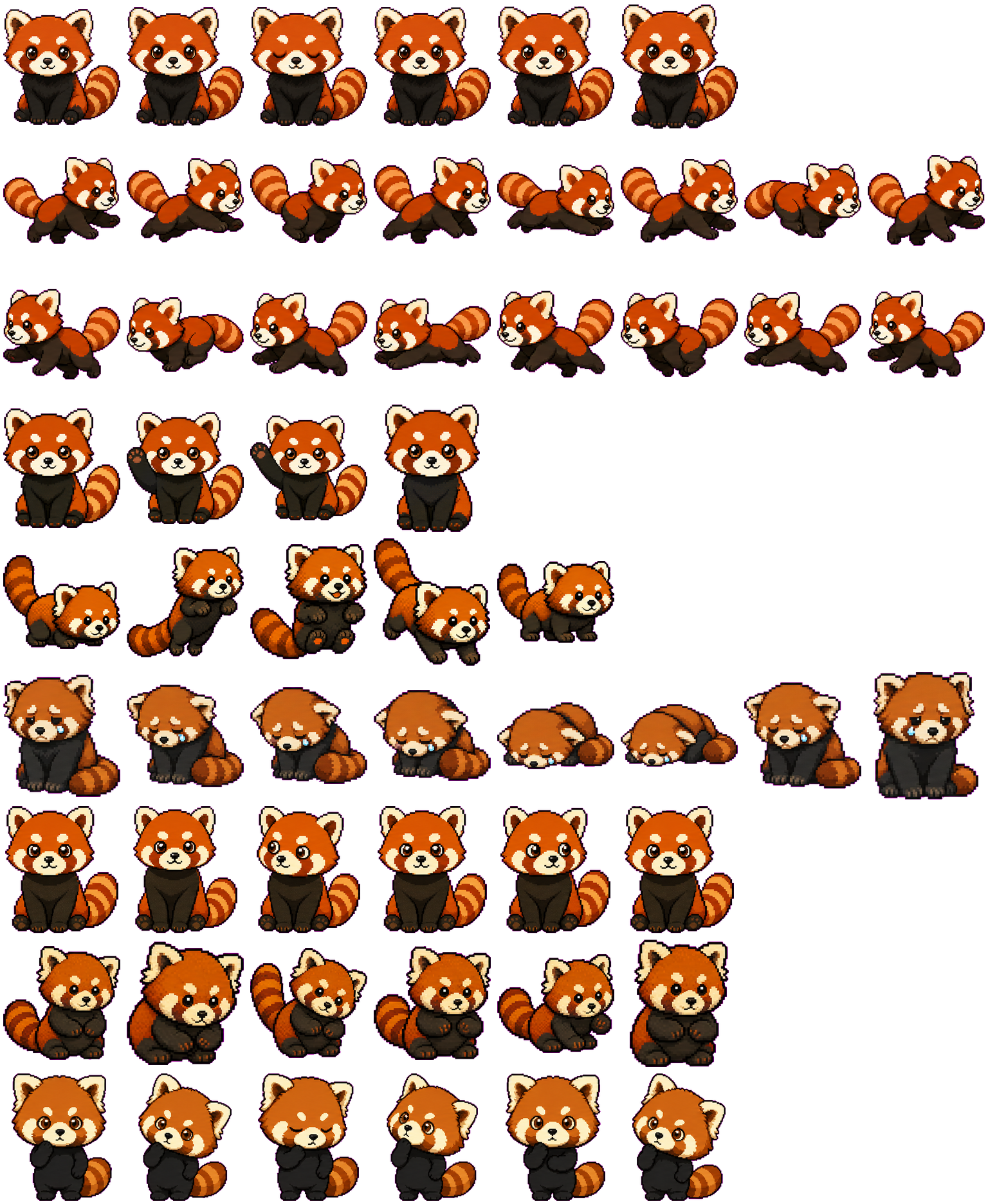
This red panda combines orange fur, white cheeks and ear rims, a dark body and a thick striped tail. Choose it for a recognizable animal with clear directional movement and a large head-down failure change. Its work and review states are quieter than the running rows. We inspected the original atlas and site preview; desktop installation was not tested.
Switch animation rows, tune scale, and test floating behavior before installing this Codex pet locally.
Loading image. You can edit the URL or reset to cancel.
Floating mode uses viewport bounds.
Pet profile
What makes Red Panda distinct?
Use these visible package traits to decide whether this pet fits your desktop before you install it.
The tail makes direction easy to follow
Run-right and run-left show a full side profile, with the thick tail trailing behind alternating stretched and gathered paws. The orange stripes and white cheeks remain recognizable when small, while individual toes and fur detail fade sooner.
Failure lowers the whole animal
The failed row moves from a sad seated face into a low forward curl, with the head close to the ground and the tail tucked alongside. This is a much larger change than the blinks in idle or waiting. Choose it if you prefer an animal posture over a floating error symbol.
A warm face above a dark body
On the inspected dark background, the orange face and tail stand out more than the black chest and feet. A pale background separates the dark body clearly. Try both at your intended scale, especially if the paws are part of what you want to see.
Animation review
How Red Panda's states read
These observations come from the original package spritesheet, not a generic species description.
Greeting and jump use larger gestures
Waving raises a front paw beside the face. Jumping crouches, lifts the panda and then lands, briefly showing more of the underside. The tail changes height with the jump rather than remaining a fixed ornament.
Running is not the same as the directional strides
The separately named Running row keeps the panda largely seated and front-facing, moving the head and front paws instead of repeating the long side-facing stride. Check all three movement-related selectors if you want a very active work-state animation.
Waiting and review need a closer look
Waiting stays seated with small head turns and blinking. Review tilts the head and brings a paw toward the cheek; there is no large tool or panel to label the state. The thoughtful pose is appealing, but it is less immediately distinguishable from a quiet idle than the failure curl.
Choose this comparison if distinct work and review props matter: its laptop and magnifying glass make those states more explicit than the red panda's paw and head movements.
Package visuals reviewed from the original spritesheet on . Reviewed by Codex Pets Team. How we review pets. These are visual observations, not an installation test or an artwork license.
State previews
See every Codex pet state at once.
Use the grid to check the nine standard action rows: idle, movement, waiting, failed, and review.
Idle
Run right
Run left
Waving
Jumping
Failed
Waiting
Running
Review
Need help?
Ask AI to add this pet.
Not sure how to use this pet in Codex? Copy this AI prompt and ask your assistant to add and enable this existing pet for you.
It installs and enables this pet only. It will not generate a new pet.
Download package
Install Red Panda
Download the zip package, or copy a community CLI or curl command that installs this Codex pet into $HOME/.codex/pets/red-panda. Then enable it with /pet or Settings -> Appearance -> Pets.
Save this file as pet.json inside the local package folder for this Codex pet.
{
  "id": "red-panda",
  "displayName": "Red Panda",
  "description": "An orange-red panda Codex pet with white cheek patches, a striped tail, side-facing strides and a low curled failure pose.",
  "spritesheetPath": "spritesheet.webp"
}
pp33pant. Attribution identifies the catalog contributor; it does not grant a license to third-party characters or artwork. Report a rights or attribution concern.
Atlas
Spritesheet contract
1536 x 1872 px8 columns x 9 rows192 x 208 px cells72 frames
Use the preview controls above to check idle, movement, waiting, failed, and review rows before installing.
Local install snippet
# After downloading red-panda-codex-pet.zip
mkdir -p "$HOME/.codex/pets/red-panda"
unzip -o "./red-panda-codex-pet.zip" -d "$HOME/.codex/pets/red-panda"

# In Codex
/pet

# Or manually
Settings -> Appearance -> Pets -> choose red-panda
Download the package zip first, then run this command from the folder that contains the zip file. After installation, use /pet or open Settings, choose Appearance, then Pets. Use Refresh custom pets if the package does not appear immediately.
How to use
How to use Red Panda
01
Review every state
Scan the 9-state preview grid to confirm the spritesheet covers idle, movement, waving, failed, waiting, and review states.
02
Download the package files
Download the package zip, or save spritesheet.webp and pet.json into a folder named after this pet id.
03
Install locally
Copy both files into ~/.codex/pets/<pet-id>/ so Codex can discover the custom pet package.
04
Open it in Codex
Use /pet inside Codex, or open Settings -> Appearance -> Pets and choose this installed pet. Refresh custom pets if it is not listed yet.