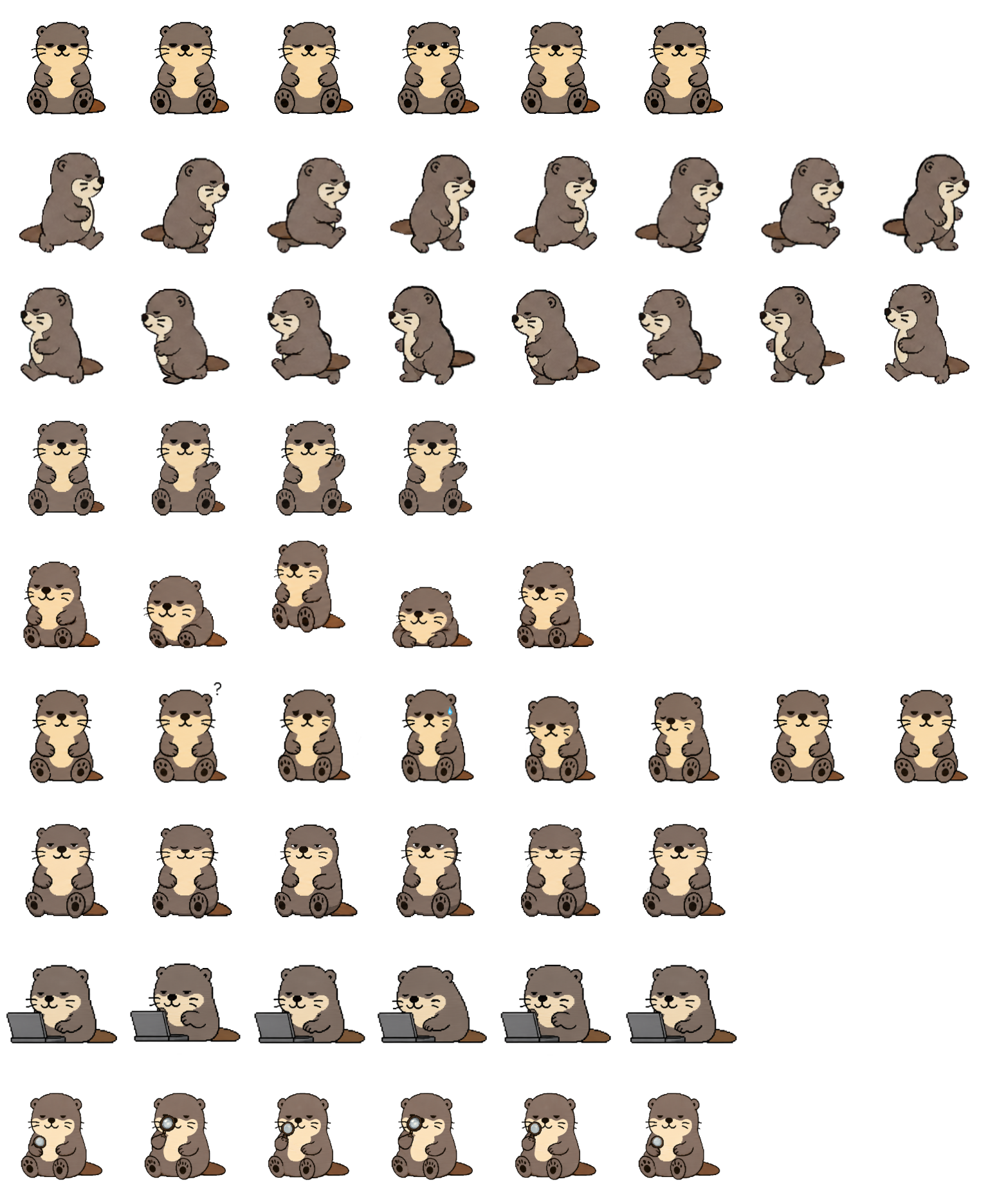
Otterumells is a rounded brown otter with a cream muzzle and belly, small whiskers, visible paw pads, and a short tail. Choose it for a quiet companion whose work and review states add recognizable props: a gray laptop and a magnifying glass. We inspected the original atlas and the site's animation preview; this review does not claim a desktop installation test.
Switch animation rows, tune scale, and test floating behavior before installing this Codex pet locally.
Floating mode uses viewport bounds.
Pet profile
What makes Otterumells distinct?
Use these visible package traits to decide whether this pet fits your desktop before you install it.
A calm, warm silhouette
The seated idle pose keeps the cream belly and dark paws in a compact front view. Small face changes carry the loop, making it a gentler choice than a mascot with large idle gestures. The fine whiskers are easier to see at a larger preview size.
Work and review have distinct props
The work row turns the otter toward a gray laptop, while review puts a small magnifying glass beside its face. These props help distinguish the two states without relying only on an eye expression; the laptop also makes the work silhouette wider.
Preview it on your background
The cream face and belly stand apart from the brown body, but the dark outline and laptop can blend into a dark desktop. Compare light and dark backgrounds before choosing a small display size. The original package uses a transparent spritesheet.
Animation review
How Otterumells's states read
These observations come from the original package spritesheet, not a generic species description.
Walking changes the viewpoint
The left and right movement rows use matching side profiles, alternating feet, and a trailing tail. They read as short steps rather than a stretched sprint, with a clear visual change from the seated idle pose.
A small wave and a visible jump
Wave lifts one paw beside the face. Jump compresses the seated body, lifts it with both paw pads visible, then lowers it again. The vertical shape change is stronger than the subtle idle loop.
Failure cues need a closer look
The failed row adds a worried mouth, a paw near the cheek, and a small blue sweat drop. Waiting keeps a still, front-facing sit. These face-level differences are less obvious at thumbnail scale than the laptop and magnifying-glass states.
Choose a terminal-shaped companion if the coding motif matters more to you than a natural animal silhouette.
Package visuals reviewed from the original spritesheet on . Reviewed by Codex Pets Team. How we review pets. These are visual observations, not an installation test or an artwork license.
State previews
See every Codex pet state at once.
Use the grid to check the nine standard action rows: idle, movement, waiting, failed, and review.
Idle
Run right
Run left
Waving
Jumping
Failed
Waiting
Running
Review
Need help?
Ask AI to add this pet.
Not sure how to use this pet in Codex? Copy this AI prompt and ask your assistant to add and enable this existing pet for you.
It installs and enables this pet only. It will not generate a new pet.
Download package
Install Otterumells
Download the zip package, or copy a community CLI or curl command that installs this Codex pet into $HOME/.codex/pets/otterumells. Then enable it with /pet or Settings -> Appearance -> Pets.
Save this file as pet.json inside the local package folder for this Codex pet.
{
  "id": "otterumells",
  "displayName": "Otterumells",
  "description": "A brown otter Codex pet with a cream belly, side-facing walking loops, a laptop work pose, and a magnifying-glass review animation.",
  "spritesheetPath": "spritesheet.webp"
}
winkpist95. Attribution identifies the catalog contributor; it does not grant a license to third-party characters or artwork. Report a rights or attribution concern.
Atlas
Spritesheet contract
1536 x 1872 px8 columns x 9 rows192 x 208 px cells72 frames
Use the preview controls above to check idle, movement, waiting, failed, and review rows before installing.
Local install snippet
# After downloading otterumells-codex-pet.zip
mkdir -p "$HOME/.codex/pets/otterumells"
unzip -o "./otterumells-codex-pet.zip" -d "$HOME/.codex/pets/otterumells"

# In Codex
/pet

# Or manually
Settings -> Appearance -> Pets -> choose otterumells
Download the package zip first, then run this command from the folder that contains the zip file. After installation, use /pet or open Settings, choose Appearance, then Pets. Use Refresh custom pets if the package does not appear immediately.
How to use
How to use Otterumells
01
Review every state
Scan the 9-state preview grid to confirm the spritesheet covers idle, movement, waving, failed, waiting, and review states.
02
Download the package files
Download the package zip, or save spritesheet.webp and pet.json into a folder named after this pet id.
03
Install locally
Copy both files into ~/.codex/pets/<pet-id>/ so Codex can discover the custom pet package.
04
Open it in Codex
Use /pet inside Codex, or open Settings -> Appearance -> Pets and choose this installed pet. Refresh custom pets if it is not listed yet.