
Terminal-shaped body
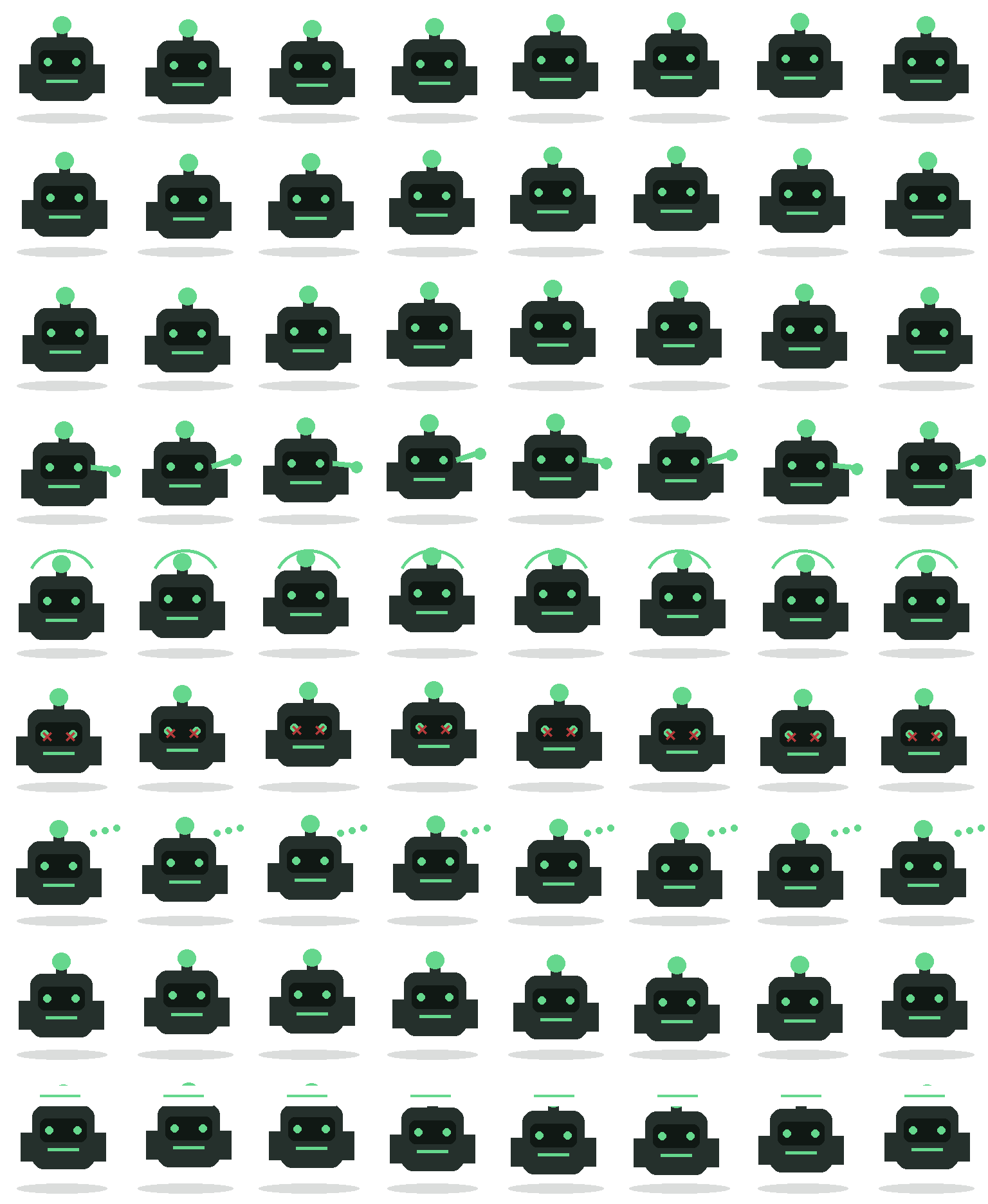
A wide dark shell, inset black display, mint eyes, and a single horizontal mouth line give Review Bot a machine-like silhouette that differs from the catalog's animal companions.
Codex pet package
Review Bot is built from a dark terminal-like body, mint display marks, a single antenna light, and a low oval shadow. Its body remains intentionally rigid while the face, antenna, arm, and status symbols distinguish active, waiting, failed, and review states.
PetWidget + SpriteAnimator
Switch animation rows, tune scale, and test floating behavior before installing this Codex pet locally.
Pet profile
Use these visible package traits to decide whether this pet fits your desktop before you install it.
A wide dark shell, inset black display, mint eyes, and a single horizontal mouth line give Review Bot a machine-like silhouette that differs from the catalog's animal companions.
The antenna light, eyes, mouth, arm, and motion marks reuse one bright mint color. That constrained palette keeps the status cues visible against the charcoal body.
The rectangular torso and short side blocks stay centered across the atlas. State changes happen around the display and antenna instead of producing a large or distracting movement profile.
Animation review
These observations come from the original package spritesheet, not a generic species description.
The directional rows make small vertical and lateral adjustments while keeping the front-facing display and antenna visible. Review Bot does not turn into a side-running character.
The wave extends a mint arm from one side of the shell. Jump frames add a curved mint arc around the antenna, creating a distinct overhead cue without changing the rigid torso.
Failure replaces the eyes with red crosses, waiting adds a mint three-dot indicator, and review raises a white status panel above the antenna. The sequence reads more like terminal feedback than an animal expression.
Compare before installing
Compare a similarly compact pet whose round organic silhouette and smiling face feel warmer and less mechanical.
Compare a more colorful coding companion that embeds its terminal motif in a fantasy animal design.
Package visuals reviewed from the original spritesheet on .
State previews
Use the grid to check whether the shared 8 by 9 atlas has complete idle, movement, waiting, failed, and review animation rows.
Need help?
Not sure how to use this pet in Codex? Copy this AI prompt and ask your assistant to add and enable this existing pet for you.
It installs and enables this pet only. It will not generate a new pet.
Download package
Download the zip package, or copy a community CLI or curl command that installs this Codex pet into $HOME/.codex/pets/review-bot. Then enable it with /pet or Settings -> Appearance -> Pets.
npx @eyichan/codexpets add review-botpet.json
Save this file as pet.json inside the local package folder for this Codex pet.
{
  "id": "review-bot",
  "displayName": "Review Bot",
  "description": "A small terminal-shaped helper built for review, failed, and waiting state previews.",
  "spritesheetPath": "spritesheet.webp"
}
Assets
Atlas
Use the preview controls above to check idle, movement, waiting, failed, and review rows before installing.
# After downloading review-bot-codex-pet.zip
mkdir -p "$HOME/.codex/pets/review-bot"
unzip -o "./review-bot-codex-pet.zip" -d "$HOME/.codex/pets/review-bot"

# In Codex
/pet

# Or manually
Settings -> Appearance -> Pets -> choose review-bot
Download the package zip first, then run this command from the folder that contains the zip file. After installation, use /pet or open Settings, choose Appearance, then Pets. Use Refresh custom pets if the package does not appear immediately.
How to use
Scan the 9-state preview grid to confirm the spritesheet covers idle, movement, waving, failed, waiting, and review states.
Download the package zip, or save spritesheet.webp and pet.json into a folder named after this pet id.
Copy both files into ~/.codex/pets/<pet-id>/ so Codex can discover the custom pet package.
Use /pet inside Codex, or open Settings -> Appearance -> Pets and choose this installed pet. Refresh custom pets if it is not listed yet.