
A compact potato silhouette
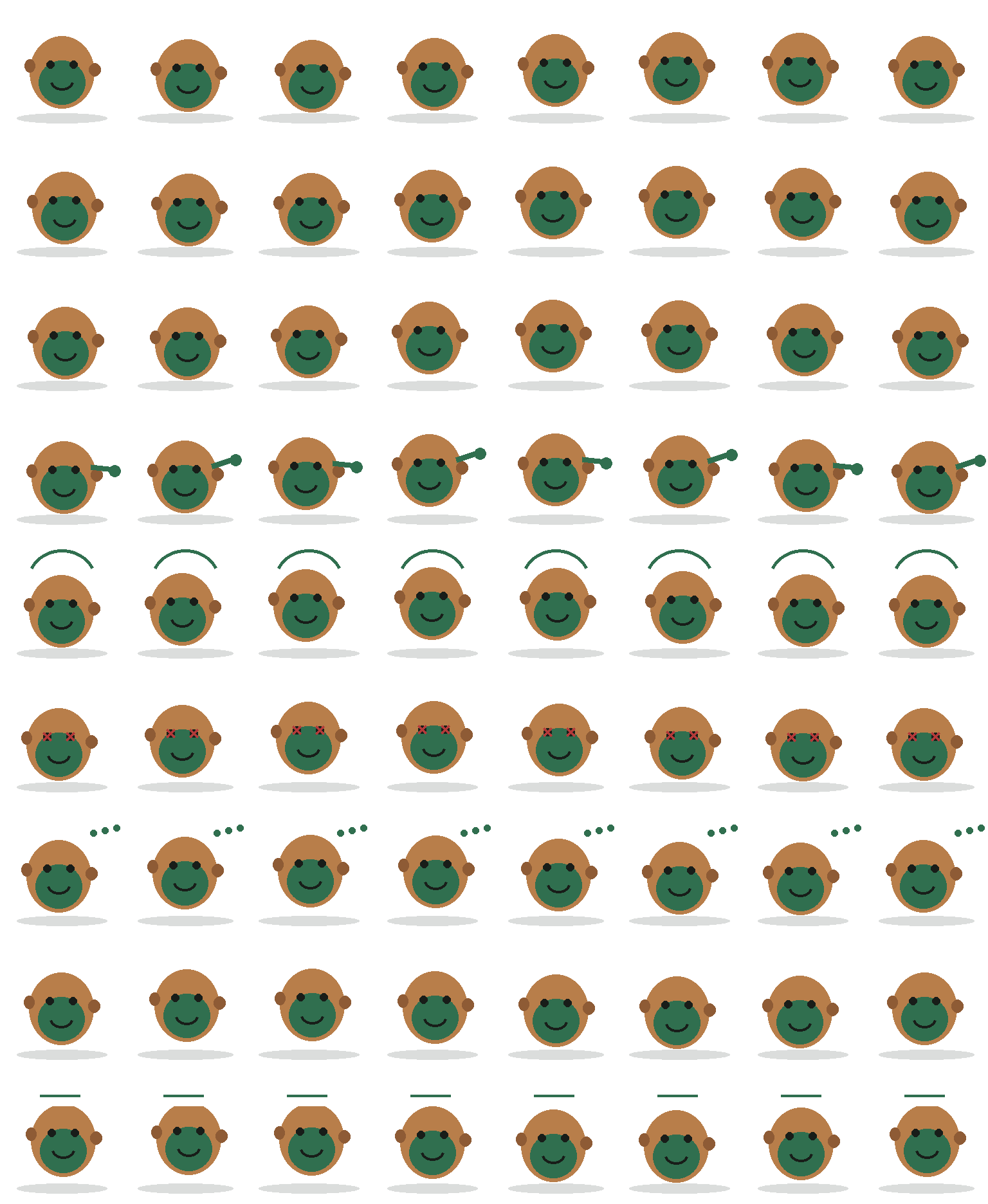
The tan outer shape and green circular face stay centered in nearly every frame. Small side nubs and the dark shadow keep Tater readable without adding clothing, tools, or a busy background.
Codex pet package
Tater uses a tan potato outline, a centered green face, tiny side nubs, and a soft oval shadow to make a deliberately simple desktop companion. The atlas keeps that round silhouette stable and communicates state through a small arm, overhead motion marks, eye changes, and status symbols.
PetWidget + SpriteAnimator
Switch animation rows, tune scale, and test floating behavior before installing this Codex pet locally.
Loading image. You can edit the URL or reset to cancel.
Pet profile
Use these visible package traits to decide whether this pet fits your desktop before you install it.
The tan outer shape and green circular face stay centered in nearly every frame. Small side nubs and the dark shadow keep Tater readable without adding clothing, tools, or a busy background.
Most animation rows preserve the same body outline, so the black eyes, curved mouth, red failure marks, and green status symbols do the visible work instead of large pose changes.
Tater occupies a compact portion of each sprite cell and leaves generous transparent space around the body, which suits a small companion that should not dominate the desktop.
Animation review
These observations come from the original package spritesheet, not a generic species description.
The directional rows use small shifts in body height, face position, and shadow width rather than turning Tater into a side profile. Motion stays subtle while the round identity remains unchanged.
The wave extends one green arm beyond the potato edge. Jump frames add a curved green arc above the head, making the vertical action easier to distinguish from the quieter movement rows.
Failure replaces the eyes with red crosses, waiting adds a three-dot green thought cue, and review introduces a white status panel above the head. Each state changes a different focal area without redrawing the body.
Compare before installing
Compare another compact companion that uses the same small-state vocabulary around a dark terminal-shaped body.
Compare a more detailed coding-themed pet with a side-running silhouette, rainbow palette, and terminal badge.
Package visuals reviewed from the original spritesheet on . Reviewed by Codex Pets Team. How we review pets. These are visual observations, not an installation test or an artwork license.
State previews
Use the grid to check the nine standard action rows: idle, movement, waiting, failed, and review.
Need help?
Not sure how to use this pet in Codex? Copy this AI prompt and ask your assistant to add and enable this existing pet for you.
It installs and enables this pet only. It will not generate a new pet.
Download package
Download the zip package, or copy a community CLI or curl command that installs this Codex pet into $HOME/.codex/pets/tater. Then enable it with /pet or Settings -> Appearance -> Pets.
npx @eyichan/codexpets add taterpet.json
Save this file as pet.json inside the local package folder for this Codex pet.
{
  "id": "tater",
  "displayName": "Tater",
  "description": "A tiny coding potato mascot with warm idle, waving, waiting, and review animations.",
  "spritesheetPath": "spritesheet.webp"
}
Assets
Atlas
Use the preview controls above to check idle, movement, waiting, failed, and review rows before installing.
# After downloading tater-codex-pet.zip
mkdir -p "$HOME/.codex/pets/tater"
unzip -o "./tater-codex-pet.zip" -d "$HOME/.codex/pets/tater"

# In Codex
/pet

# Or manually
Settings -> Appearance -> Pets -> choose tater
Download the package zip first, then run this command from the folder that contains the zip file. After installation, use /pet or open Settings, choose Appearance, then Pets. Use Refresh custom pets if the package does not appear immediately.
How to use
Scan the 9-state preview grid to confirm the spritesheet covers idle, movement, waving, failed, waiting, and review states.
Download the package zip, or save spritesheet.webp and pet.json into a folder named after this pet id.
Copy both files into ~/.codex/pets/<pet-id>/ so Codex can discover the custom pet package.
Use /pet inside Codex, or open Settings -> Appearance -> Pets and choose this installed pet. Refresh custom pets if it is not listed yet.