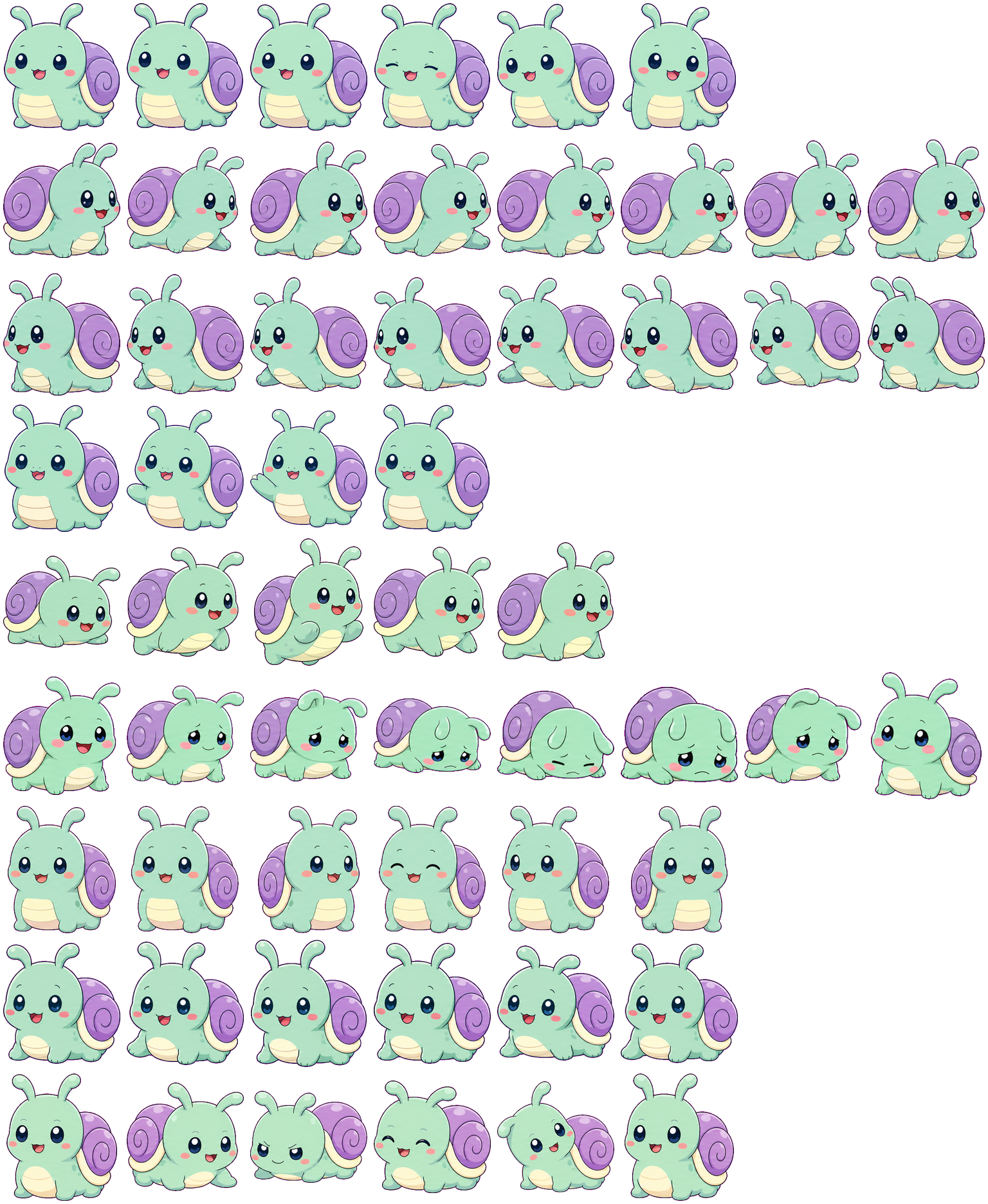
Shellpop Snail pairs a mint-green body and rounded antennae with a lavender spiral shell, cream belly and pink cheeks. Choose it for a soft pastel companion whose shell remains part of every pose. The quiet states use similar face changes, so it is less useful when you need an unmistakable waiting-versus-review signal. We inspected the original atlas and site preview, without testing desktop installation.
Switch animation rows, tune scale, and test floating behavior before installing this Codex pet locally.
Loading image. You can edit the URL or reset to cancel.
Floating mode uses viewport bounds.
Pet profile
What makes Shellpop Snail distinct?
Use these visible package traits to decide whether this pet fits your desktop before you install it.
A shell that stays recognizable in motion
Directional rows turn the snail into a side view, stretch the lower body and shift the shell with each step. The shell stays behind the face rather than becoming a detached prop. Its broad lavender circle is easier to recognize at small size than the fine spiral line.
Failure folds the face toward the floor
The failed row droops the antennae, lowers the head and flattens the body beneath the shell before returning upright. It changes the outline more than waiting, which keeps the head raised. There is no large error icon, making this a softer failure cue.
Pastel colors depend on the background
On the light inspection background, the mint head and cream belly have less contrast than the lavender shell and navy eyes. Darkness separates the body colors more clearly, though the thin outline becomes less prominent. Enlarge the preview if the blush, spiral or mouth is important.
Animation review
How Shellpop Snail's states read
These observations come from the original package spritesheet, not a generic species description.
Wave and jump keep the snail shape
Waving extends a short mint arm beside the face. Jumping crouches and lifts the body with the shell still attached, then settles down. Both retain the antennae and shell, unlike a pet whose action replaces the whole silhouette with a symbol.
Running is a frontal bounce
The Running row faces forward and bobs the body with small foot and antenna movements. The directional rows show a much clearer left or right profile. Choose by the states you expect to watch, rather than judging only the default idle.
Quiet expressions overlap
Waiting uses blinks and slight head tilts. Review also changes eyelids, tilts the head and briefly lowers the face without adding a book, magnifying glass or code panel. Those subtle expressions work for a calm companion but need close inspection to tell apart.
Both keep a large object around the body, but Boxcat uses a rigid container and a head sinking behind its rim, while Shellpop moves the soft body beneath a round shell.
Package visuals reviewed from the original spritesheet on . Reviewed by Codex Pets Team. How we review pets. These are visual observations, not an installation test or an artwork license.
State previews
See every Codex pet state at once.
Use the grid to check the nine standard action rows: idle, movement, waiting, failed, and review.
Idle
Run right
Run left
Waving
Jumping
Failed
Waiting
Running
Review
Need help?
Ask AI to add this pet.
Not sure how to use this pet in Codex? Copy this AI prompt and ask your assistant to add and enable this existing pet for you.
It installs and enables this pet only. It will not generate a new pet.
Download package
Install Shellpop Snail
Download the zip package, or copy a community CLI or curl command that installs this Codex pet into $HOME/.codex/pets/shellpop-snail. Then enable it with /pet or Settings -> Appearance -> Pets.
Save this file as pet.json inside the local package folder for this Codex pet.
{
  "id": "shellpop-snail",
  "displayName": "Shellpop Snail",
  "description": "A mint-green snail Codex pet with a lavender spiral shell, rounded antennae, a small wave and a drooping failure animation.",
  "spritesheetPath": "spritesheet.webp"
}
sherly-li. Attribution identifies the catalog contributor; it does not grant a license to third-party characters or artwork. Report a rights or attribution concern.
Atlas
Spritesheet contract
1536 x 1872 px8 columns x 9 rows192 x 208 px cells72 frames
Use the preview controls above to check idle, movement, waiting, failed, and review rows before installing.
Local install snippet
# After downloading shellpop-snail-codex-pet.zip
mkdir -p "$HOME/.codex/pets/shellpop-snail"
unzip -o "./shellpop-snail-codex-pet.zip" -d "$HOME/.codex/pets/shellpop-snail"

# In Codex
/pet

# Or manually
Settings -> Appearance -> Pets -> choose shellpop-snail
Download the package zip first, then run this command from the folder that contains the zip file. After installation, use /pet or open Settings, choose Appearance, then Pets. Use Refresh custom pets if the package does not appear immediately.
How to use
How to use Shellpop Snail
01
Review every state
Scan the 9-state preview grid to confirm the spritesheet covers idle, movement, waving, failed, waiting, and review states.
02
Download the package files
Download the package zip, or save spritesheet.webp and pet.json into a folder named after this pet id.
03
Install locally
Copy both files into ~/.codex/pets/<pet-id>/ so Codex can discover the custom pet package.
04
Open it in Codex
Use /pet inside Codex, or open Settings -> Appearance -> Pets and choose this installed pet. Refresh custom pets if it is not listed yet.