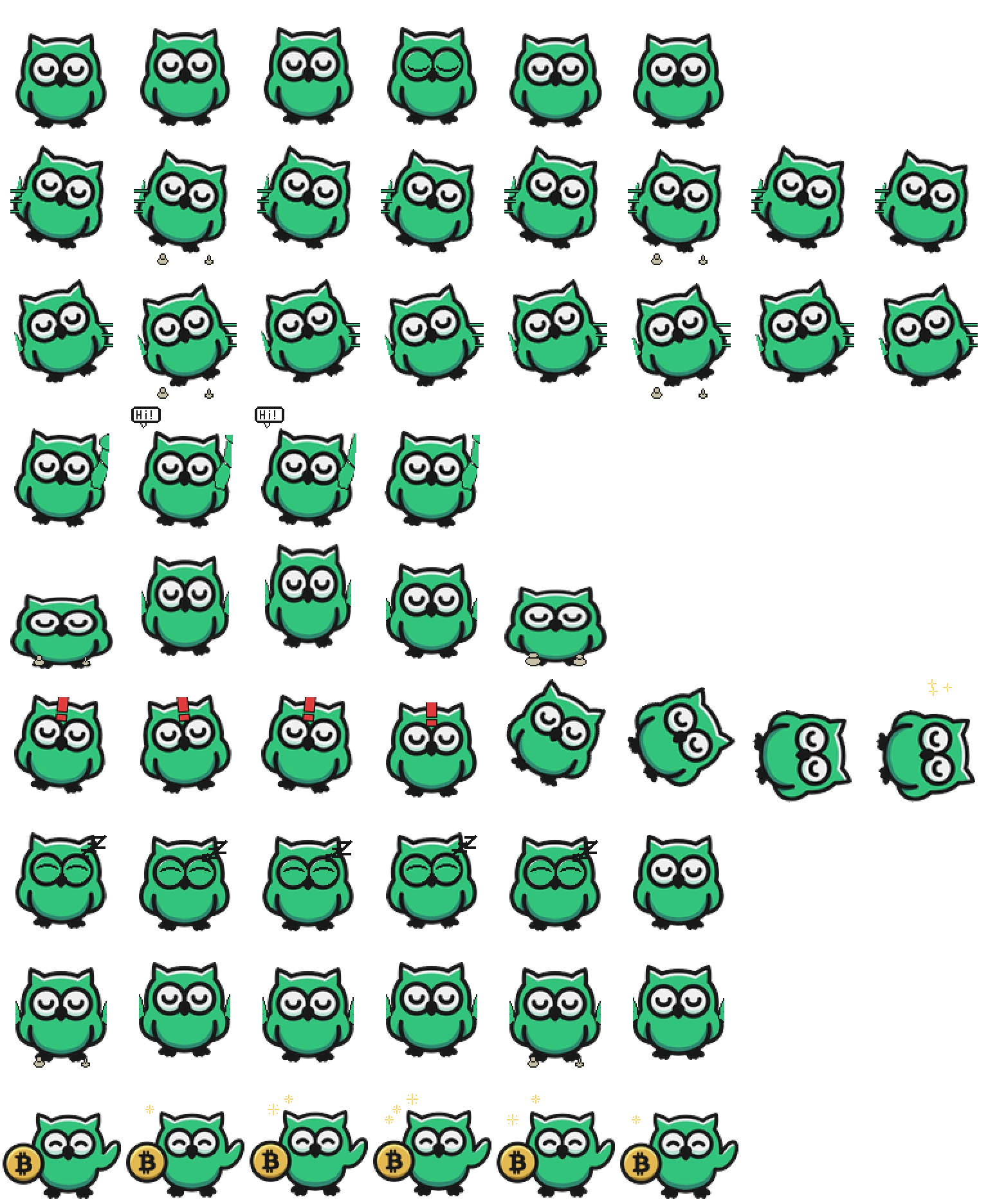
Peri is a round emerald-green owl with oversized white eyes, pointed ear tufts and a thick dark outline. Choose it for bold color and a simple front-facing silhouette. The original package describes Peri as Peridot Finance's mascot; its coin artwork is decoration, not a portfolio tool. We inspected the original atlas and site preview, without testing a desktop installation.
Switch animation rows, tune scale, and test floating behavior before installing this Codex pet locally.
Loading image. You can edit the URL or reset to cancel.
Floating mode uses viewport bounds.
Pet profile
What makes Peri the Owl distinct?
Use these visible package traits to decide whether this pet fits your desktop before you install it.
Big eyes survive a small preview
The white eye circles and green body remain the dominant shapes when the pet is small. Tiny feet, movement marks and the waving greeting are easier to lose at thumbnail size. Peri suits readers who prefer a clear mascot shape over detailed feathers or natural owl anatomy.
Failure changes the whole silhouette
A red exclamation mark appears above the head before Peri tilts and falls onto its side. That full-body change is easier to distinguish than a pet whose failure cue is only a small tear or mouth change. The side pose also uses more horizontal space.
Check the dark outline on your background
The bright body and white eyes stand out on a dark background, while the outline and feet are less distinct there. A light background reveals the outline more clearly. Preview both before choosing a display size; the original spritesheet has transparent space around the owl.
Animation review
How Peri the Owl's states read
These observations come from the original package spritesheet, not a generic species description.
Movement leans without turning sideways
Both directional rows keep the face visible and lean the rounded body, with mirrored trailing lines and alternating feet. The separate Running row stays front-facing too. Choose another pet if you want a strong side-profile walk or an obvious work-specific prop.
Wave, jump and waiting use different cues
Wave lifts a wing beside the face and adds a small Hi! greeting in some frames. Jump squashes the body, lifts it, and settles back down. Waiting closes the eyes and adds a small sleep cue; that cue benefits from a larger preview.
Review adds a coin rather than a coding tool
The review row shows a gold coin with a Bitcoin-style symbol beside the owl, a raised wing and small sparkles overhead. It is visually distinct from the plain standing rows, but it does not depict a magnifying glass, code panel or actual financial activity. Prefer a different companion if the finance-themed imagery distracts you.
Compare a softer brown animal with a side-profile walk, laptop work pose and magnifying-glass review cue.
Package visuals reviewed from the original spritesheet on . Reviewed by Codex Pets Team. How we review pets. These are visual observations, not an installation test or an artwork license.
State previews
See every Codex pet state at once.
Use the grid to check the nine standard action rows: idle, movement, waiting, failed, and review.
Idle
Run right
Run left
Waving
Jumping
Failed
Waiting
Running
Review
Need help?
Ask AI to add this pet.
Not sure how to use this pet in Codex? Copy this AI prompt and ask your assistant to add and enable this existing pet for you.
It installs and enables this pet only. It will not generate a new pet.
Download package
Install Peri the Owl
Download the zip package, or copy a community CLI or curl command that installs this Codex pet into $HOME/.codex/pets/peri-the-owl. Then enable it with /pet or Settings -> Appearance -> Pets.
Save this file as pet.json inside the local package folder for this Codex pet.
{
  "id": "peri-the-owl",
  "displayName": "Peri the Owl",
  "description": "An emerald-green owl Codex pet with large white eyes, mirrored movement loops, a side-tipping failure pose, and a gold coin in its review animation.",
  "spritesheetPath": "spritesheet.webp"
}
asyncsan. Attribution identifies the catalog contributor; it does not grant a license to third-party characters or artwork. Report a rights or attribution concern.
Atlas
Spritesheet contract
1536 x 1872 px8 columns x 9 rows192 x 208 px cells72 frames
Use the preview controls above to check idle, movement, waiting, failed, and review rows before installing.
Local install snippet
# After downloading peri-the-owl-codex-pet.zip
mkdir -p "$HOME/.codex/pets/peri-the-owl"
unzip -o "./peri-the-owl-codex-pet.zip" -d "$HOME/.codex/pets/peri-the-owl"

# In Codex
/pet

# Or manually
Settings -> Appearance -> Pets -> choose peri-the-owl
Download the package zip first, then run this command from the folder that contains the zip file. After installation, use /pet or open Settings, choose Appearance, then Pets. Use Refresh custom pets if the package does not appear immediately.
How to use
How to use Peri the Owl
01
Review every state
Scan the 9-state preview grid to confirm the spritesheet covers idle, movement, waving, failed, waiting, and review states.
02
Download the package files
Download the package zip, or save spritesheet.webp and pet.json into a folder named after this pet id.
03
Install locally
Copy both files into ~/.codex/pets/<pet-id>/ so Codex can discover the custom pet package.
04
Open it in Codex
Use /pet inside Codex, or open Settings -> Appearance -> Pets and choose this installed pet. Refresh custom pets if it is not listed yet.