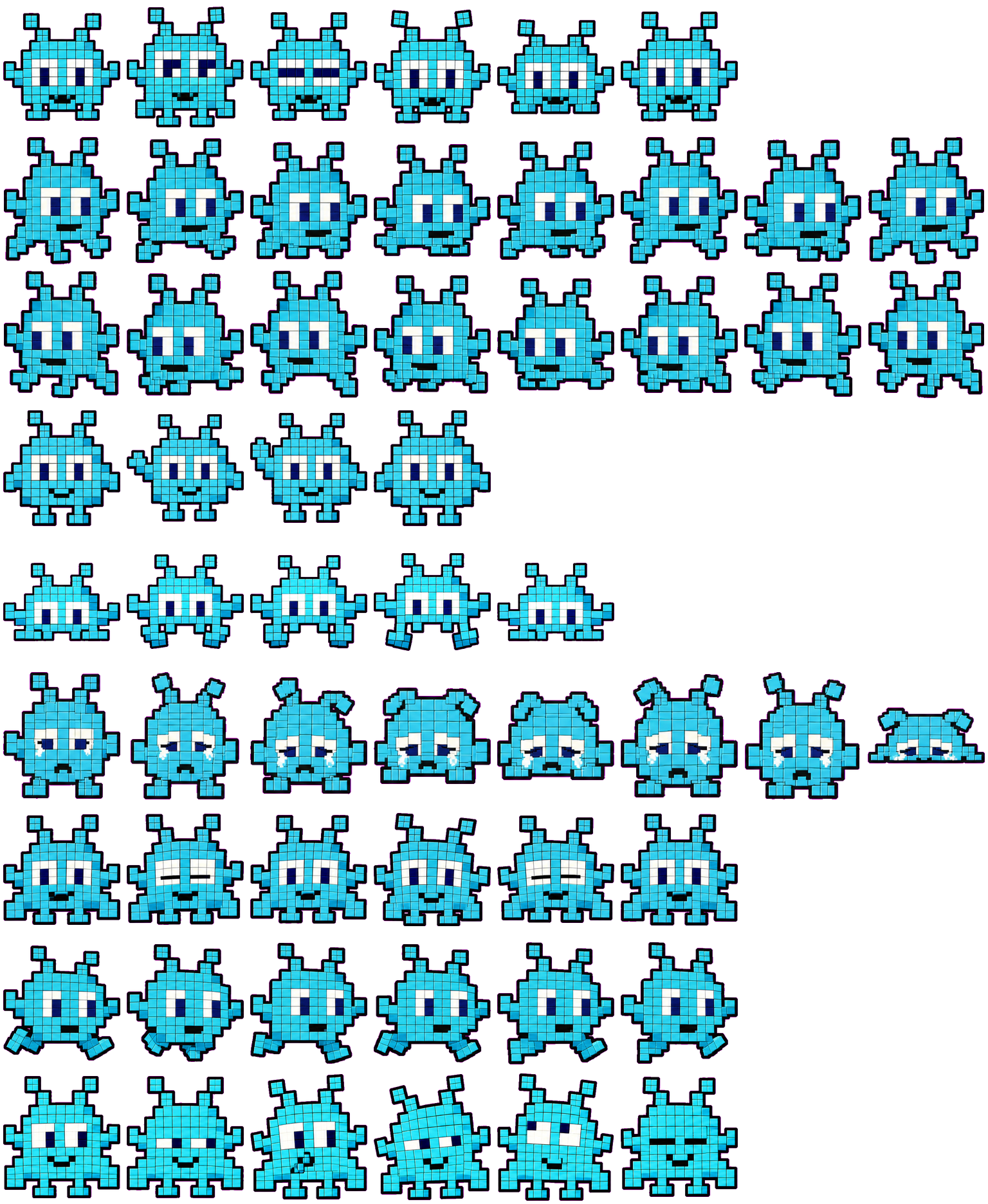
Mosaic Invader turns a cyan, big-eyed character into a grid of small square tiles. Its antennae and block-shaped arms make a clear arcade-style outline. The texture is easiest to appreciate enlarged; at smaller sizes the large eyes and broad failure pose carry more meaning than individual tiles.
Switch animation rows, tune scale, and test floating behavior before installing this Codex pet locally.
Loading image. You can edit the URL or reset to cancel.
Floating mode uses viewport bounds.
Pet profile
What makes Mosaic Invader distinct?
Use these visible package traits to decide whether this pet fits your desktop before you install it.
Square tiles rather than a smooth outline
Both the body and antenna tips use visible cyan squares with darker seams. This gives it a more rigid, graphic appearance than Axobotl's rounded body and frills. At reduced scale the seams merge, leaving a simpler blue shape with white eyes.
Both directional rows keep the eyes visible
The feet shift and spread differently in the two travel directions, but the character remains largely front-facing. Direction is less immediate than Eagle's fully turned beak and body. Running also keeps the eyes forward while alternating the angular legs.
Bright eyes help on a dark background
White eye panels and the cyan body retain contrast on the tested dark surface. The black outer border is easier to follow on a pale one. Choose it for a bright graphic companion, rather than for natural animal anatomy or soft shading.
Animation review
How Mosaic Invader's states read
These observations come from the original package spritesheet, not a generic species description.
Wave moves a block arm; jump squashes the body
Wave lifts an arm beside the head. Jump starts with a low, wide body, lifts the square feet and antennae, then returns to the compressed shape. Looking across the sequence avoids mistaking its preparation frame for the entire jump.
Failure bends the antennae and flattens the silhouette
The eye panels narrow, white tear streaks appear and the antennae bend inward. The final frame is markedly lower and wider. That outline change is a stronger small-size signal than the individual tear pixels.
Review tilts; waiting mostly blinks
Waiting retains a relaxed front-facing outline with closed-eye and leaning frames. Review tilts the tiled body and changes the arm and eye positions. No document or magnifying glass is added, so these two states need closer inspection than failure or waving.
Compare a much simpler floating face if the tiled texture and moving antennae feel too busy.
Package visuals reviewed from the original spritesheet on . Reviewed by Codex Pets Team. How we review pets. These are visual observations, not an installation test or an artwork license.
State previews
See every Codex pet state at once.
Use the grid to check the nine standard action rows: idle, movement, waiting, failed, and review.
Idle
Run right
Run left
Waving
Jumping
Failed
Waiting
Running
Review
Need help?
Ask AI to add this pet.
Not sure how to use this pet in Codex? Copy this AI prompt and ask your assistant to add and enable this existing pet for you.
It installs and enables this pet only. It will not generate a new pet.
Download package
Install Mosaic Invader
Download the zip package, or copy a community CLI or curl command that installs this Codex pet into $HOME/.codex/pets/mosaic-invader. Then enable it with /pet or Settings -> Appearance -> Pets.
Xander W.. Attribution identifies the catalog contributor; it does not grant a license to third-party characters or artwork. Report a rights or attribution concern.
Package source
No original source link is recorded for this package.
Reuse permission
A download or author credit does not establish a license. Check the original source's terms for your intended use; if they are unclear, ask the creator before reusing the artwork. How to check source and permission.
Atlas
Spritesheet contract
1536 x 1872 px8 columns x 9 rows192 x 208 px cells72 frames
Use the preview controls above to check idle, movement, waiting, failed, and review rows before installing.
Local install snippet
# After downloading mosaic-invader-codex-pet.zip
mkdir -p "$HOME/.codex/pets/mosaic-invader"
unzip -o "./mosaic-invader-codex-pet.zip" -d "$HOME/.codex/pets/mosaic-invader"

# In Codex
/pet

# Or manually
Settings -> Appearance -> Pets -> choose mosaic-invader
Download the package zip first, then run this command from the folder that contains the zip file. After installation, use /pet or open Settings, choose Appearance, then Pets. Use Refresh custom pets if the package does not appear immediately.
How to use
How to use Mosaic Invader
01
Review every state
Scan the 9-state preview grid to confirm the spritesheet covers idle, movement, waving, failed, waiting, and review states.
02
Download the package files
Download the package zip, or save spritesheet.webp and pet.json into a folder named after this pet id.
03
Install locally
Copy both files into ~/.codex/pets/<pet-id>/ so Codex can discover the custom pet package.
04
Open it in Codex
Use /pet inside Codex, or open Settings -> Appearance -> Pets and choose this installed pet. Refresh custom pets if it is not listed yet.