
Carried Laptop Prop
The companion wears a mint hoodie and round glasses while holding a lavender-gray laptop with a mint clover. The laptop stays in paws during directional bounds.
Codex pet package
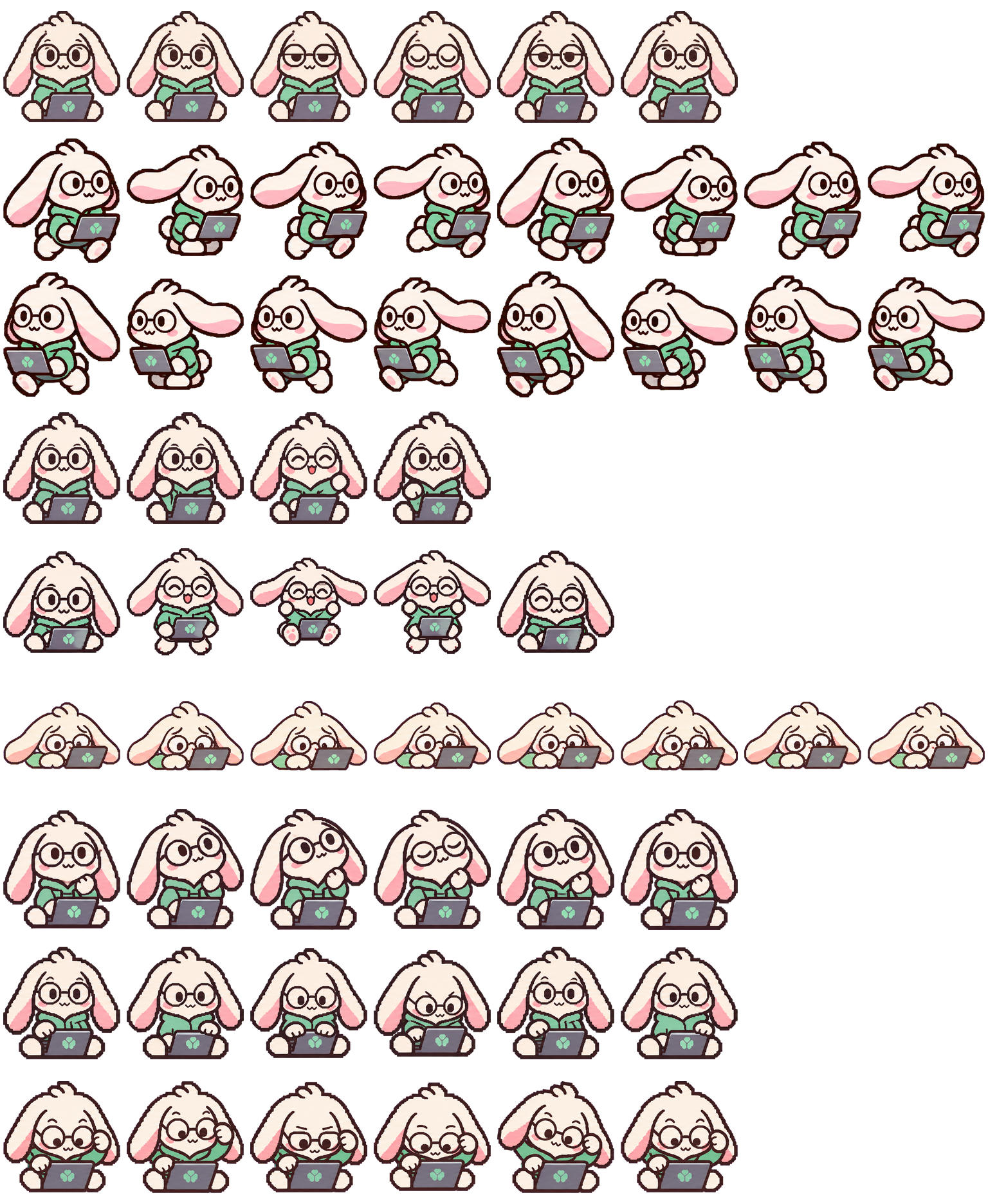
LVK Rabbit is a cream lop companion with pink inner ears, round glasses, and a mint hoodie holding a lavender-gray laptop with a mint clover. The held laptop helps identify Running as the rabbit faces forward and taps with raised paws. A lowered posture signals Failed when the rabbit drops close to the floor behind the laptop.
PetWidget + SpriteAnimator
Switch animation rows, tune scale, and test floating behavior before installing this Codex pet locally.
Loading image. You can edit the URL or reset to cancel.
Pet profile
Use these visible package traits to decide whether this pet fits your desktop before you install it.
The companion wears a mint hoodie and round glasses while holding a lavender-gray laptop with a mint clover. The laptop stays in paws during directional bounds.
Pale fur separates more visibly against a dark inspection background. The outline supplies contrast against pale surfaces.
The mint clover on the laptop and subtle eyelid changes are less legible at small scale.
Animation review
These observations come from the original package spritesheet, not a generic species description.
Idle faces forward with slow eyelid changes. Waiting angles the head while seated upright. Review leans toward the screen with low glasses.
Right and Left bound across the preview with opposing profiles as ears stream and the laptop stays in paws. Running faces forward and taps with raised paws.
Wave raises a paw by the computer. Jump spreads ears and opens the legs. Failed drops close to the floor behind the laptop.
Compare before installing
Bilby Bird offers a direct comparison because this bird uses a laptop as a working prop. Viewers can inspect how this bird uses its laptop prop while LVK Rabbit carries a laptop in paws.
Belayer Cat provides an alternate equipment comparison as a tall equipped cat with a rope-working animation. Viewers can evaluate this rope-working motion alongside LVK Rabbit holding a laptop.
Package visuals reviewed from the original spritesheet on . Reviewed by Codex Pets Team. How we review pets. These are visual observations, not an installation test or an artwork license.
State previews
Use the grid to check the nine standard action rows: idle, movement, waiting, failed, and review.
Need help?
Not sure how to use this pet in Codex? Copy this AI prompt and ask your assistant to add and enable this existing pet for you.
It installs and enables this pet only. It will not generate a new pet.
Download package
Download the zip package, or copy a community CLI or curl command that installs this Codex pet into $HOME/.codex/pets/lvk-rabbit. Then enable it with /pet or Settings -> Pets.
npx @eyichan/codexpets add lvk-rabbitpet.json
Save this file as pet.json inside the local package folder for this Codex pet.
{
  "id": "lvk-rabbit",
  "displayName": "LVK Rabbit",
  "description": "Cream lop rabbit Codex pet featuring pink inner ears, round glasses, a mint hoodie, and a lavender-gray laptop with a mint clover.",
  "spritesheetPath": "spritesheet.webp"
}
Atlas
Use the preview controls above to check idle, movement, waiting, failed, and review rows before installing.
Assets
# After downloading lvk-rabbit-codex-pet.zip
mkdir -p "$HOME/.codex/pets/lvk-rabbit"
unzip -o "./lvk-rabbit-codex-pet.zip" -d "$HOME/.codex/pets/lvk-rabbit"

# In Codex
/pet

# Or manually
Settings -> Pets -> choose lvk-rabbit
Download the package zip first, then run this command from the folder that contains the zip file. After installation, use /pet or open Settings and choose Pets (Mini & pets in some versions). Use Refresh if the package does not appear immediately.
How to use
Scan the 9-state preview grid to confirm the spritesheet covers idle, movement, waving, failed, waiting, and review states.
Download the package zip, or save spritesheet.webp and pet.json into a folder named after this pet id.
Copy both files into ~/.codex/pets/<pet-id>/ so Codex can discover the custom pet package.
Use /pet inside Codex, or open Settings -> Pets and choose this installed pet. Refresh custom pets if it is not listed yet.