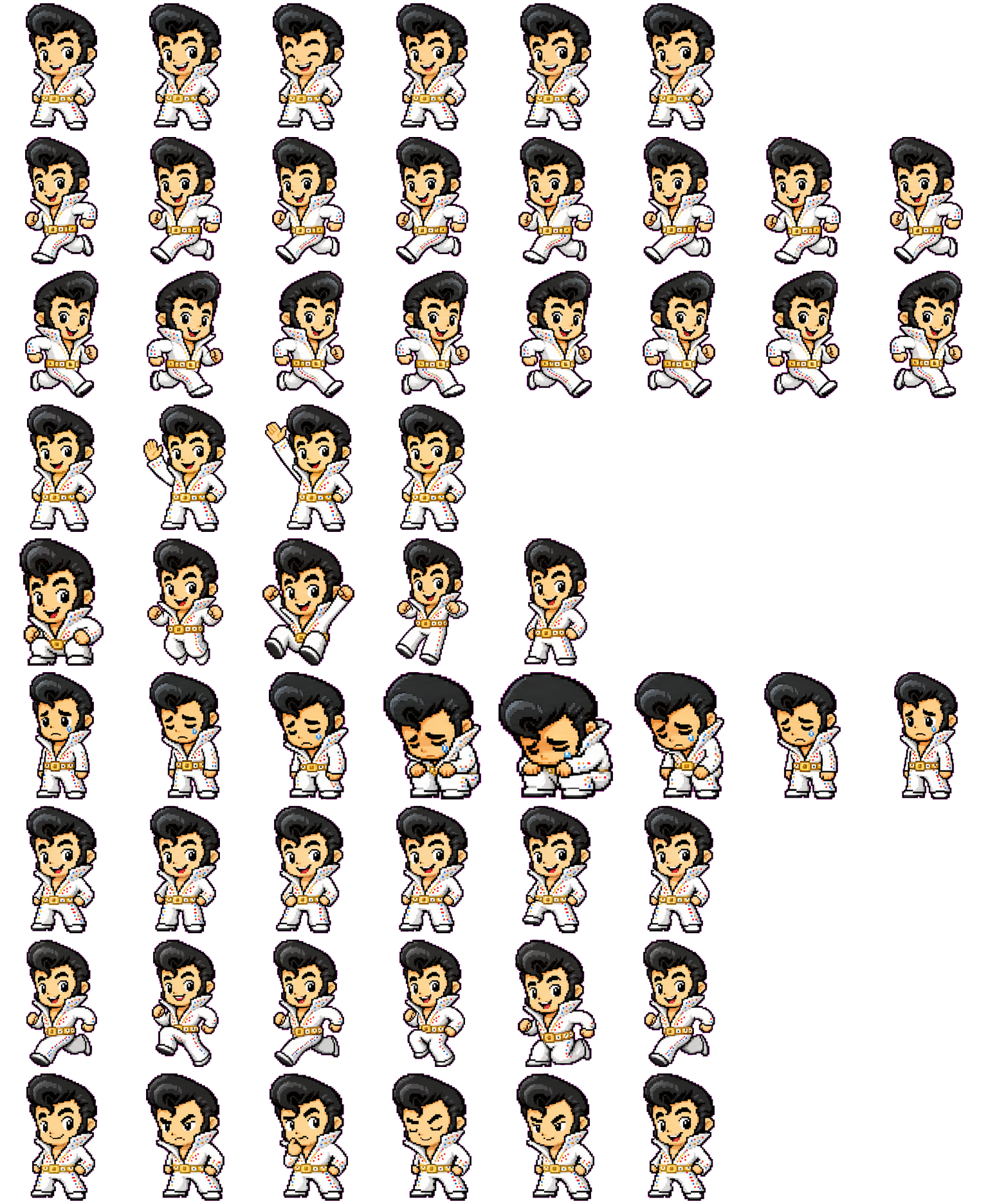
Elvis is a small human-shaped character with a black pompadour, white jumpsuit, gold-colored belt and tiny colored suit accents. The hair and clothing make a different silhouette from the animal companions. Wide arm and leg gestures carry the action; the smallest face and costume details need a larger preview.
Switch animation rows, tune scale, and test floating behavior before installing this Codex pet locally.
Loading image. You can edit the URL or reset to cancel.
Floating mode uses viewport bounds.
Pet profile
What makes Elvis distinct?
Use these visible package traits to decide whether this pet fits your desktop before you install it.
Hair anchors a narrow upright silhouette
The large swept hairstyle stays visible when the belt studs and colored suit marks become small specks. The character is taller and narrower than Chikny's round body. Choose it for a recognizable outfit and pose rather than a soft animal outline.
Running turns the outfit with the stride
The directional rows face opposite ways, with bent arms, extended legs and the high collar still visible. Running uses a separate lively stepping pose. There is no need to read a tiny status symbol to recognize those movement states.
White suit and dark hair trade places in contrast
On a dark surface the jumpsuit stands out while the black hair edge becomes quieter. A pale surface emphasizes the hair but reduces separation around the white sleeves and legs; their outline still helps. Check both at the size you plan to use.
Animation review
How Elvis's states read
These observations come from the original package spritesheet, not a generic species description.
An overhead greeting and a tucked-leg jump
Wave raises a hand above the shoulder and then above the head. Jump drops into a crouch before lifting both arms and folding the legs underneath the body. These gestures are more conspicuous than the small idle smile and blink.
Failure lowers the head and shoulders
The expression becomes sad, small blue tear pixels appear and the body folds into a crouched pose. It rises again before the sequence ends. The lowered head and bent knees are easier to see than the tears themselves.
Waiting keeps the hands near the belt
Waiting mainly shifts weight and changes the eyes while keeping the familiar standing outfit. Review adds a hand near the chin, a head tilt and a more concentrated brow. Neither uses a separate document or tool, making those states less immediate than the wave or run.
Compare a simpler round silhouette whose broad yellow wings remain easy to follow when small.
Package visuals reviewed from the original spritesheet on . Reviewed by Codex Pets Team. How we review pets. These are visual observations, not an installation test or an artwork license.
State previews
See every Codex pet state at once.
Use the grid to check the nine standard action rows: idle, movement, waiting, failed, and review.
Idle
Run right
Run left
Waving
Jumping
Failed
Waiting
Running
Review
Need help?
Ask AI to add this pet.
Not sure how to use this pet in Codex? Copy this AI prompt and ask your assistant to add and enable this existing pet for you.
It installs and enables this pet only. It will not generate a new pet.
Download package
Install Elvis
Download the zip package, or copy a community CLI or curl command that installs this Codex pet into $HOME/.codex/pets/elvis. Then enable it with /pet or Settings -> Appearance -> Pets.
Save this file as pet.json inside the local package folder for this Codex pet.
{
  "id": "elvis",
  "displayName": "Elvis",
  "description": "A tiny Elvis-inspired digital pet with a pompadour, white jumpsuit, and stage-ready charm.",
  "spritesheetPath": "spritesheet.webp"
}
Seymour. Attribution identifies the catalog contributor; it does not grant a license to third-party characters or artwork. Report a rights or attribution concern.
Package source
No original source link is recorded for this package.
Reuse permission
A download or author credit does not establish a license. Check the original source's terms for your intended use; if they are unclear, ask the creator before reusing the artwork. How to check source and permission.
Atlas
Spritesheet contract
1536 x 1872 px8 columns x 9 rows192 x 208 px cells72 frames
Use the preview controls above to check idle, movement, waiting, failed, and review rows before installing.
Local install snippet
# After downloading elvis-codex-pet.zip
mkdir -p "$HOME/.codex/pets/elvis"
unzip -o "./elvis-codex-pet.zip" -d "$HOME/.codex/pets/elvis"

# In Codex
/pet

# Or manually
Settings -> Appearance -> Pets -> choose elvis
Download the package zip first, then run this command from the folder that contains the zip file. After installation, use /pet or open Settings, choose Appearance, then Pets. Use Refresh custom pets if the package does not appear immediately.
How to use
How to use Elvis
01
Review every state
Scan the 9-state preview grid to confirm the spritesheet covers idle, movement, waving, failed, waiting, and review states.
02
Download the package files
Download the package zip, or save spritesheet.webp and pet.json into a folder named after this pet id.
03
Install locally
Copy both files into ~/.codex/pets/<pet-id>/ so Codex can discover the custom pet package.
04
Open it in Codex
Use /pet inside Codex, or open Settings -> Appearance -> Pets and choose this installed pet. Refresh custom pets if it is not listed yet.