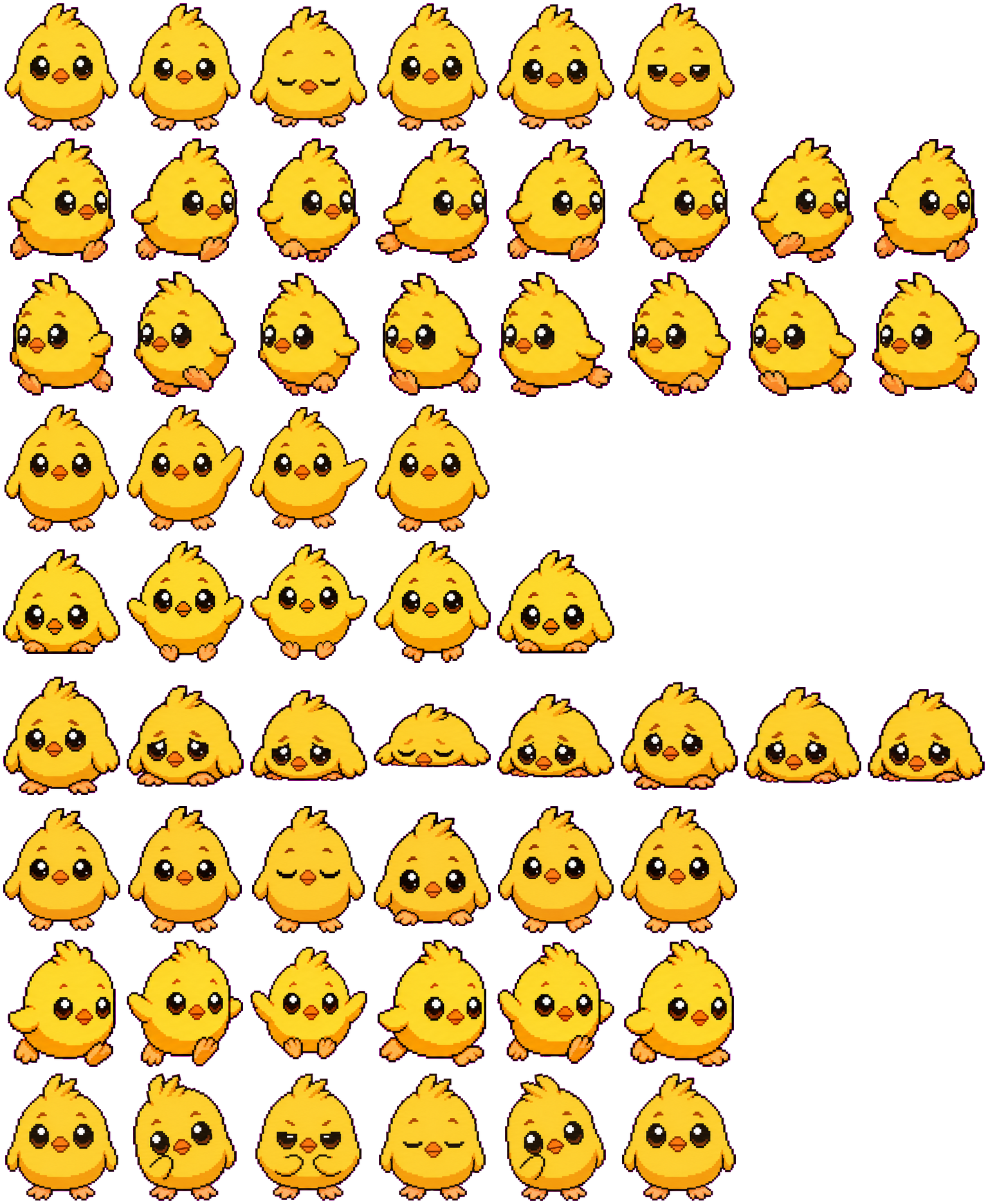
Chikny is a round yellow chick with an orange belly edge, tiny beak and three-point head tuft. Its broad wing wave and squash-shaped jump are easy to recognize. Waiting and review are quieter, relying on blinks, head position and a wing near the cheek instead of status props.
Switch animation rows, tune scale, and test floating behavior before installing this Codex pet locally.
Loading image. You can edit the URL or reset to cancel.
Floating mode uses viewport bounds.
Pet profile
What makes Chikny distinct?
Use these visible package traits to decide whether this pet fits your desktop before you install it.
A bright body with a simple face
The yellow outline, dark eyes and orange feet remain readable in a small preview. Small eye highlights and feather-edge shading fade first. The tested dark background emphasizes the bright body; the dark outline is more visible on a pale background.
The wing changes more than the beak
The greeting extends one wing well beyond the round body. During a jump both wings spread and the feet lift beneath a taller pose. These broad changes make Chikny easier to follow than a companion whose only action cue is a small symbol.
Friendly movement without a coding prop
Left and right runs show opposite three-quarter faces and alternating orange feet. Running faces more toward the viewer and occasionally spreads both wings. The package keeps its animal theme throughout rather than adding a laptop or review panel.
Animation review
How Chikny's states read
These observations come from the original package spritesheet, not a generic species description.
Jump alternates a squat and a lifted outline
The first and last jump frames compress the chick near the floor. The middle frames raise its wings and separate its feet from that resting line. Watch those changes rather than judging the jump from a single crouched thumbnail.
Failure becomes a low yellow shape
The eyes look sad as the wings and body sink. The chick briefly flattens with closed eyes, then partially rises while retaining a low outline. The height change survives reduction better than the small watery-eye details.
Review uses a cheek-touch gesture
Review brings a wing to the cheek, narrows the eyes and tilts the head. Waiting mostly blinks and briefly lowers the body. Both retain the same yellow face, so a larger scale helps when you need to tell these states apart quickly.
Compare an upright animal with small raised-paw gestures and a less wide jump outline.
Package visuals reviewed from the original spritesheet on . Reviewed by Codex Pets Team. How we review pets. These are visual observations, not an installation test or an artwork license.
State previews
See every Codex pet state at once.
Use the grid to check the nine standard action rows: idle, movement, waiting, failed, and review.
Idle
Run right
Run left
Waving
Jumping
Failed
Waiting
Running
Review
Need help?
Ask AI to add this pet.
Not sure how to use this pet in Codex? Copy this AI prompt and ask your assistant to add and enable this existing pet for you.
It installs and enables this pet only. It will not generate a new pet.
Download package
Install Chikny
Download the zip package, or copy a community CLI or curl command that installs this Codex pet into $HOME/.codex/pets/chikny. Then enable it with /pet or Settings -> Appearance -> Pets.
Save this file as pet.json inside the local package folder for this Codex pet.
{
  "id": "chikny",
  "displayName": "Chikny",
  "description": "Chikny is a round chick-like fantasy hatchling Codex pet with glossy eyes, tufted feathers, stubby wings, and a soft yellow-orange palette.",
  "spritesheetPath": "spritesheet.webp"
}
sj-bs. Attribution identifies the catalog contributor; it does not grant a license to third-party characters or artwork. Report a rights or attribution concern.
Package source
No original source link is recorded for this package.
Reuse permission
A download or author credit does not establish a license. Check the original source's terms for your intended use; if they are unclear, ask the creator before reusing the artwork. How to check source and permission.
Atlas
Spritesheet contract
1536 x 1872 px8 columns x 9 rows192 x 208 px cells72 frames
Use the preview controls above to check idle, movement, waiting, failed, and review rows before installing.
Local install snippet
# After downloading chikny-codex-pet.zip
mkdir -p "$HOME/.codex/pets/chikny"
unzip -o "./chikny-codex-pet.zip" -d "$HOME/.codex/pets/chikny"

# In Codex
/pet

# Or manually
Settings -> Appearance -> Pets -> choose chikny
Download the package zip first, then run this command from the folder that contains the zip file. After installation, use /pet or open Settings, choose Appearance, then Pets. Use Refresh custom pets if the package does not appear immediately.
How to use
How to use Chikny
01
Review every state
Scan the 9-state preview grid to confirm the spritesheet covers idle, movement, waving, failed, waiting, and review states.
02
Download the package files
Download the package zip, or save spritesheet.webp and pet.json into a folder named after this pet id.
03
Install locally
Copy both files into ~/.codex/pets/<pet-id>/ so Codex can discover the custom pet package.
04
Open it in Codex
Use /pet inside Codex, or open Settings -> Appearance -> Pets and choose this installed pet. Refresh custom pets if it is not listed yet.