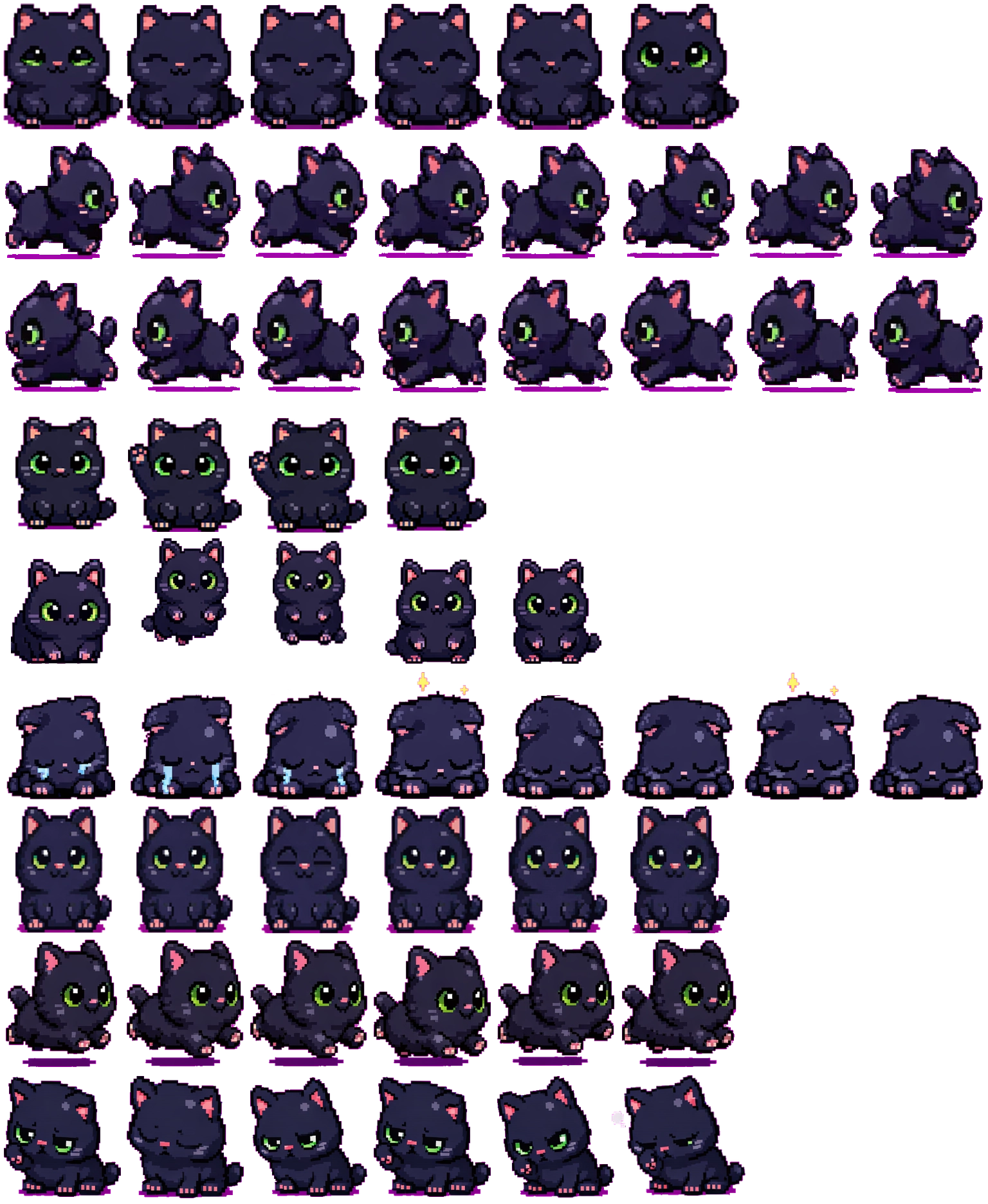

Sideways motion is clear
The directional rows turn the head and body into profile, with an upright tail and alternating paws. The running row repeats that side-facing movement rather than the frontal idle pose.
Codex pet package
A chubby black cat Codex pet with big green eyes, a tiny pink nose, and playful desktop animations.
PetWidget + SpriteAnimator
Switch animation rows, tune scale, and test floating behavior before installing this Codex pet locally.
Loading image. You can edit the URL or reset to cancel.
Before you choose
Chonk is a rounded dark cat with green eyes, pink ear interiors and a magenta accent near the feet. The eyes carry much of the expression because the body occupies a compact, dark shape.
The directional rows turn the head and body into profile, with an upright tail and alternating paws. The running row repeats that side-facing movement rather than the frontal idle pose.
The failed row folds the ears down and adds blue tears, with small bright marks above the head in some frames. Review instead angles the head and narrows the eyes. The cues are different even though both rows keep the cat low.
On the dark inspection background, the body outline is subtler than the green eyes. Try it against your actual wallpaper before using a small scale; a light background will separate the dark coat more strongly.
Compare with Maltese: Maltese uses a white body and heavy dark outline, creating the opposite light-dark balance without relying on colored eyes.
Visual review by Codex Pets Team. Original atlas rows inspected on . How we review pets. These are visual observations, not an installation test or a license grant. Use the state previews below to check your preferred size.
State previews
Use the grid to check the nine standard action rows: idle, movement, waiting, failed, and review.
Need help?
Not sure how to use this pet in Codex? Copy this AI prompt and ask your assistant to add and enable this existing pet for you.
It installs and enables this pet only. It will not generate a new pet.
Download package
Download the zip package, or copy a community CLI or curl command that installs this Codex pet into $HOME/.codex/pets/chonk. Then enable it with /pet or Settings -> Appearance -> Pets.
npx @eyichan/codexpets add chonkpet.json
Save this file as pet.json inside the local package folder for this Codex pet.
{
  "id": "chonk",
  "displayName": "Chonk",
  "description": "A chubby black cat Codex pet with big green eyes, a tiny pink nose, and playful desktop animations.",
  "spritesheetPath": "spritesheet.webp"
}
Assets
Atlas
Use the preview controls above to check idle, movement, waiting, failed, and review rows before installing.
# After downloading chonk-codex-pet.zip
mkdir -p "$HOME/.codex/pets/chonk"
unzip -o "./chonk-codex-pet.zip" -d "$HOME/.codex/pets/chonk"

# In Codex
/pet

# Or manually
Settings -> Appearance -> Pets -> choose chonk
Download the package zip first, then run this command from the folder that contains the zip file. After installation, use /pet or open Settings, choose Appearance, then Pets. Use Refresh custom pets if the package does not appear immediately.
How to use
Scan the 9-state preview grid to confirm the spritesheet covers idle, movement, waving, failed, waiting, and review states.
Download the package zip, or save spritesheet.webp and pet.json into a folder named after this pet id.
Copy both files into ~/.codex/pets/<pet-id>/ so Codex can discover the custom pet package.
Use /pet inside Codex, or open Settings -> Appearance -> Pets and choose this installed pet. Refresh custom pets if it is not listed yet.