
Idle
Codex pet package
Sima
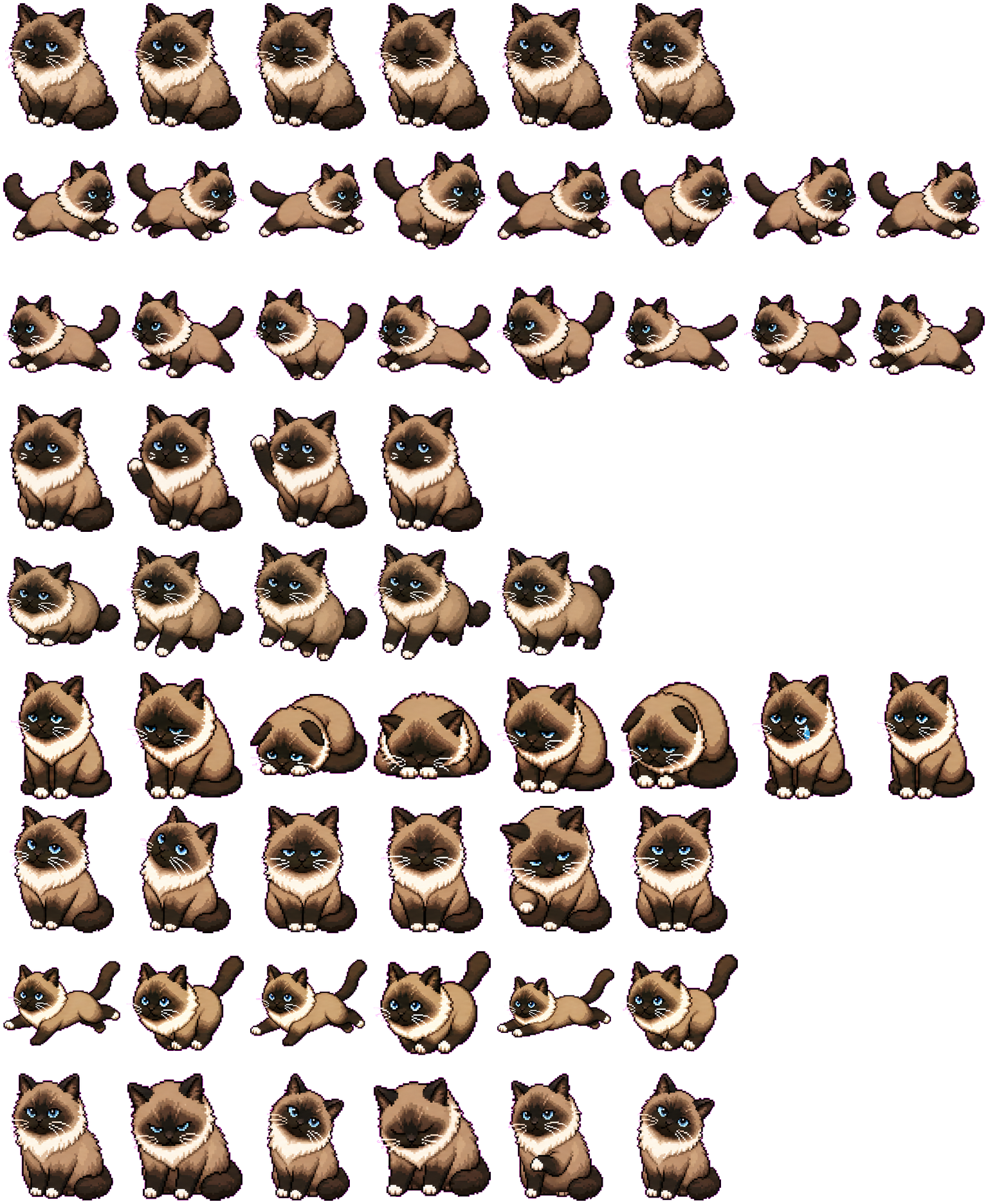
Sima is a memorial cat Codex pet created as a warm animated desktop tribute to a beloved companion.
PetWidget + SpriteAnimator
Sima live preview
Switch animation rows, tune scale, and test floating behavior before installing this Codex pet locally.
Loading image. You can edit the URL or reset to cancel.
Floating mode uses viewport bounds.
State previews
See every Codex pet state at once.
Use the grid to check the nine standard action rows: idle, movement, waiting, failed, and review.
Run right
Run left
Waving
Jumping
Failed
Waiting
Running
Review
Need help?
Ask AI to add this pet.
Not sure how to use this pet in Codex? Copy this AI prompt and ask your assistant to add and enable this existing pet for you.
It installs and enables this pet only. It will not generate a new pet.
Download package
Install Sima
Download the zip package, or copy a community CLI or curl command that installs this Codex pet into $HOME/.codex/pets/sima. Then enable it with /pet or Settings -> Appearance -> Pets.
npx @eyichan/codexpets add simapet.json
Manifest
Save this file as pet.json inside the local package folder for this Codex pet.
{
  "id": "sima",
  "displayName": "Sima",
  "description": "Sima is a memorial cat Codex pet created as a warm animated desktop tribute to a beloved companion.",
  "spritesheetPath": "spritesheet.webp"
}
Assets
Package files
- Package ZIP
- Download ZIP
- Spritesheet URL
- /pets/sima/spritesheet.webp
- Manifest URL
- /pets/sima/pet.json
- Author
- Костянтин Б.. Attribution identifies the catalog contributor; it does not grant a license to third-party characters or artwork. Report a rights or attribution concern.
Atlas
Spritesheet contract
1536 x 1872 px8 columns x 9 rows192 x 208 px cells72 frames
Use the preview controls above to check idle, movement, waiting, failed, and review rows before installing.
Local install snippet
# After downloading sima-codex-pet.zip
mkdir -p "$HOME/.codex/pets/sima"
unzip -o "./sima-codex-pet.zip" -d "$HOME/.codex/pets/sima"

# In Codex
/pet

# Or manually
Settings -> Appearance -> Pets -> choose sima
Download the package zip first, then run this command from the folder that contains the zip file. After installation, use /pet or open Settings, choose Appearance, then Pets. Use Refresh custom pets if the package does not appear immediately.
How to use
How to use Sima
- 01
Review every state
Scan the 9-state preview grid to confirm the spritesheet covers idle, movement, waving, failed, waiting, and review states.
- 02
Download the package files
Download the package zip, or save spritesheet.webp and pet.json into a folder named after this pet id.
- 03
Install locally
Copy both files into ~/.codex/pets/<pet-id>/ so Codex can discover the custom pet package.
- 04
Open it in Codex
Use /pet inside Codex, or open Settings -> Appearance -> Pets and choose this installed pet. Refresh custom pets if it is not listed yet.