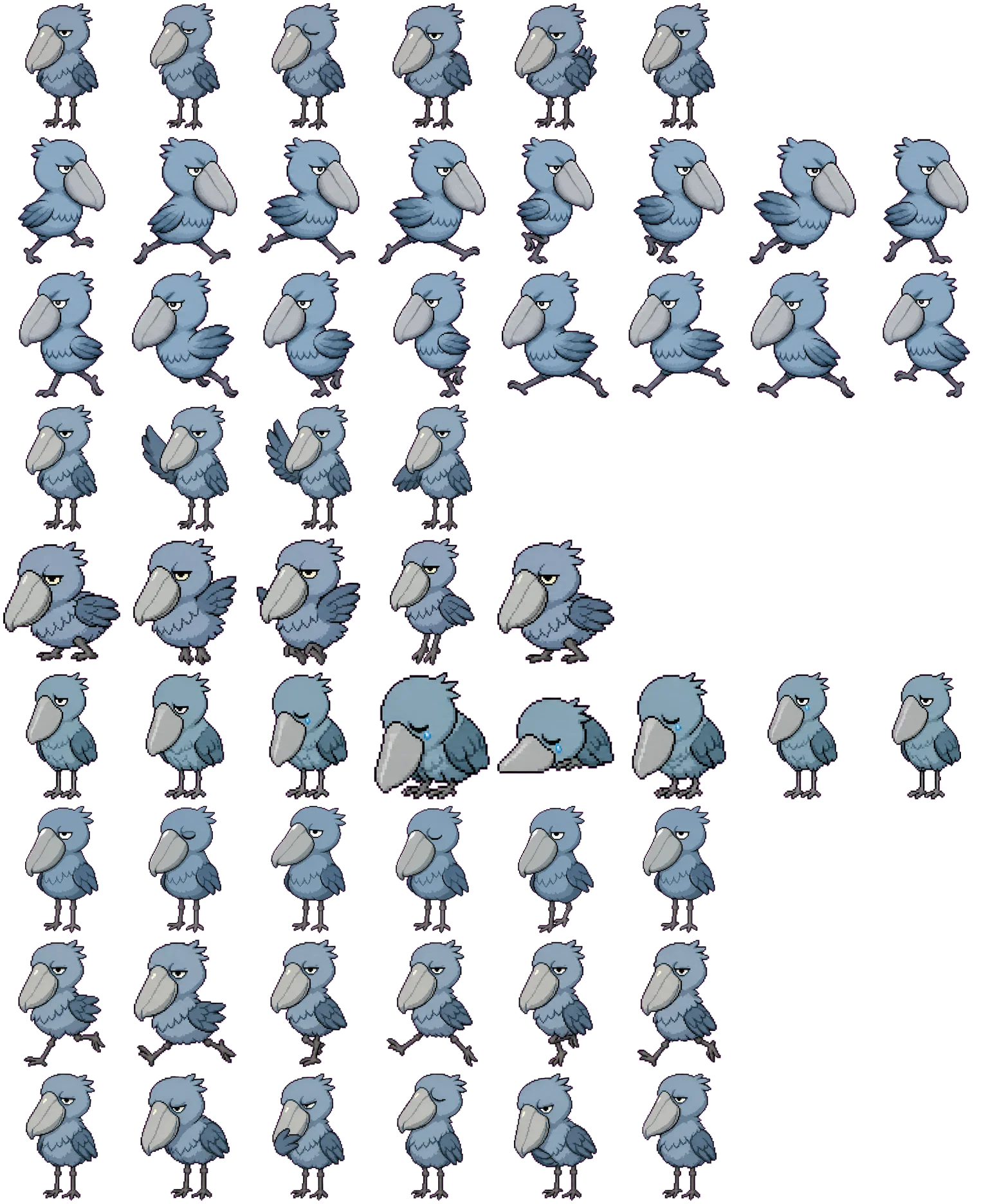

Recognizable shoebill silhouette
The broad shoe-shaped beak remains the visual anchor from idle poses through the running, waving, waiting, and review rows.
Codex pet package
Shoeby turns a shoebill's oversized beak, upright stance, and steady expression into a compact desktop companion. Preview how its distinctive silhouette reads across all nine Codex pet states before downloading the package.
PetWidget + SpriteAnimator
Switch animation rows, tune scale, and test floating behavior before installing this Codex pet locally.
Loading image. You can edit the URL or reset to cancel.
Pet profile
Use these visible package traits to decide whether this pet fits your desktop before you install it.
The broad shoe-shaped beak remains the visual anchor from idle poses through the running, waving, waiting, and review rows.
Blue-gray feathers, an upright stance, and a steady half-lidded expression keep Shoeby readable without a busy on-screen profile.
Inspect the original spritesheet, all nine animation states, pet.json, and the downloadable ZIP before adding Shoeby to Codex.
Animation review
These observations come from the original package spritesheet, not a generic species description.
Run-left and run-right frames stretch Shoeby's legs and shift the wings while the oversized gray beak remains the largest shape. Direction changes stay legible without replacing the front-facing identity.
The wave lifts and fans one wing beside the body. Jumping compresses the legs and raises the body, producing a vertical pose change instead of reusing the running motion.
Failed frames lower the head and body, close the eye, and add a visible blue tear. Waiting and review return to an upright pose with smaller eye, wing, and stance changes.
Package visuals reviewed from the original spritesheet on . Reviewed by Codex Pets Team. How we review pets. These are visual observations, not an installation test or an artwork license.
State previews
Use the grid to check the nine standard action rows: idle, movement, waiting, failed, and review.
Need help?
Not sure how to use this pet in Codex? Copy this AI prompt and ask your assistant to add and enable this existing pet for you.
It installs and enables this pet only. It will not generate a new pet.
Download package
Download the zip package, or copy a community CLI or curl command that installs this Codex pet into $HOME/.codex/pets/shoeby. Then enable it with /pet or Settings -> Appearance -> Pets.
npx @eyichan/codexpets add shoebypet.json
Save this file as pet.json inside the local package folder for this Codex pet.
{
  "id": "shoeby",
  "displayName": "Shoeby",
  "description": "Shoeby is a shoebill Codex pet with a massive shoe-shaped beak, pixel-adjacent styling, and calm intense eyes.",
  "spritesheetPath": "spritesheet.webp"
}
Assets
Atlas
Use the preview controls above to check idle, movement, waiting, failed, and review rows before installing.
# After downloading shoeby-codex-pet.zip
mkdir -p "$HOME/.codex/pets/shoeby"
unzip -o "./shoeby-codex-pet.zip" -d "$HOME/.codex/pets/shoeby"

# In Codex
/pet

# Or manually
Settings -> Appearance -> Pets -> choose shoeby
Download the package zip first, then run this command from the folder that contains the zip file. After installation, use /pet or open Settings, choose Appearance, then Pets. Use Refresh custom pets if the package does not appear immediately.
How to use
Scan the 9-state preview grid to confirm the spritesheet covers idle, movement, waving, failed, waiting, and review states.
Download the package zip, or save spritesheet.webp and pet.json into a folder named after this pet id.
Copy both files into ~/.codex/pets/<pet-id>/ so Codex can discover the custom pet package.
Use /pet inside Codex, or open Settings -> Appearance -> Pets and choose this installed pet. Refresh custom pets if it is not listed yet.