
Unmistakable insect anatomy
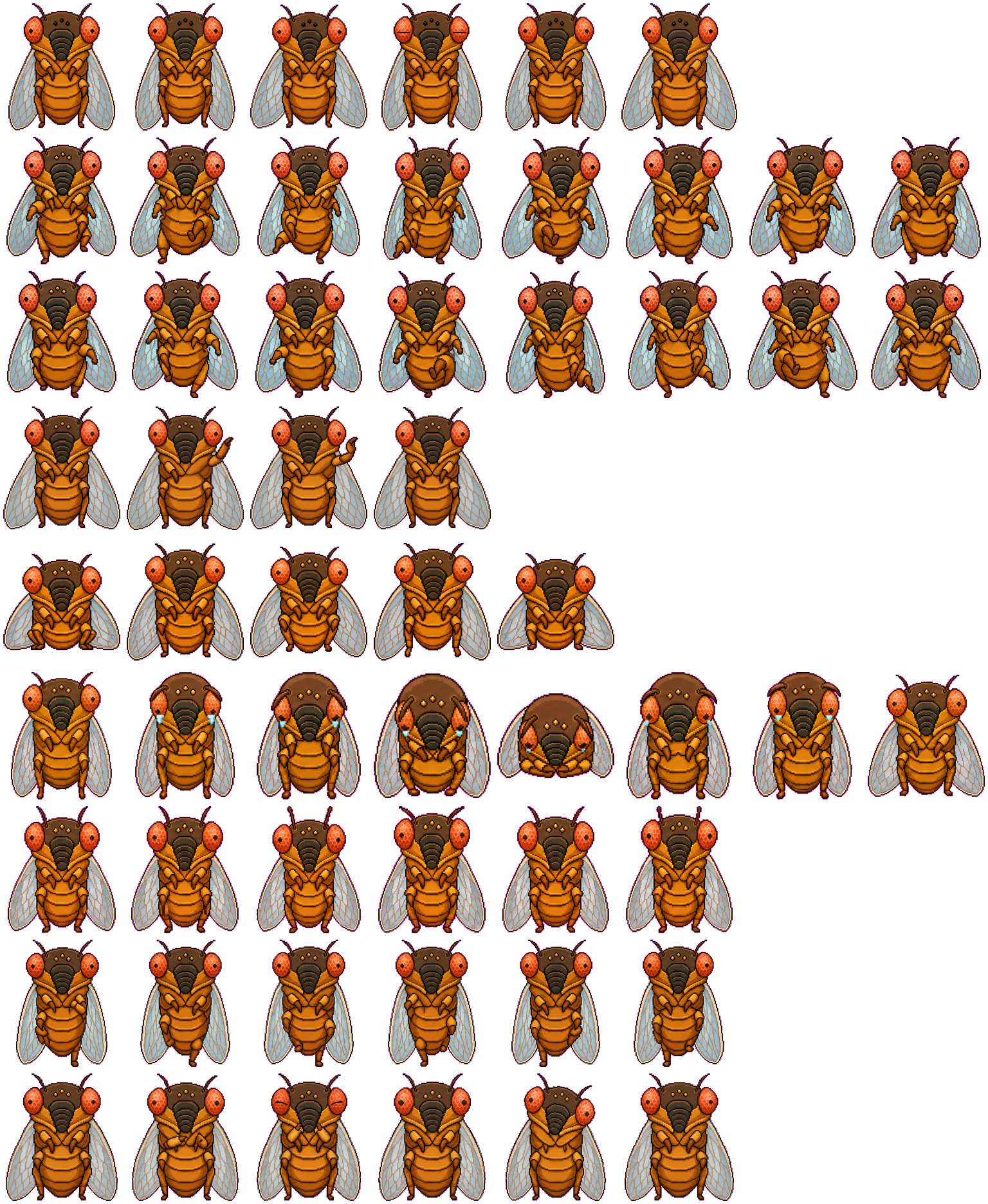
Large compound eyes, a tapered dark face, segmented abdomen, paired wings, and six-leg structure make Cicada distinct from mammal-shaped pets even in a small preview.
Codex pet package
Cicada turns an adult cicada's orange segmented body, translucent veined wings, red compound eyes, short antennae, and dark ridged face into an unusually anatomical Codex pet. Most states preserve the front-facing silhouette and express motion through the legs, wings, eyes, and body height.
PetWidget + SpriteAnimator
Switch animation rows, tune scale, and test floating behavior before installing this Codex pet locally.
Loading image. You can edit the URL or reset to cancel.
Pet profile
Use these visible package traits to decide whether this pet fits your desktop before you install it.
Large compound eyes, a tapered dark face, segmented abdomen, paired wings, and six-leg structure make Cicada distinct from mammal-shaped pets even in a small preview.
Unlike pets that turn sideways to run, Cicada keeps its broad frontal wing shape and changes limb placement, body height, and facial details across the atlas.
Pale transparent wings use visible vein lines and dark edging, adding texture without covering the orange abdomen or red eyes.
Animation review
These observations come from the original package spritesheet, not a generic species description.
Run-left and run-right shift the legs and body balance while retaining the frontal torso. Direction is subtler than a side-running animal, so the wing and limb changes matter most.
The wave raises a foreleg beside the face, while jumping lifts the body and changes the lower-leg spacing. Both keep the full wing outline visible.
Failed frames introduce blue tears and a folded, lowered posture. Waiting and review return to the full body but vary the eyes, antennae, and foreleg positions instead of inventing a new silhouette.
Compare before installing
Compare another arthropod-inspired pet with a darker detective theme and a smaller, rounder silhouette.
Compare a winged animal that favors a compact yellow body and much simpler surface detail.
Package visuals reviewed from the original spritesheet on . Reviewed by Codex Pets Team. How we review pets. These are visual observations, not an installation test or an artwork license.
State previews
Use the grid to check the nine standard action rows: idle, movement, waiting, failed, and review.
Need help?
Not sure how to use this pet in Codex? Copy this AI prompt and ask your assistant to add and enable this existing pet for you.
It installs and enables this pet only. It will not generate a new pet.
Download package
Download the zip package, or copy a community CLI or curl command that installs this Codex pet into $HOME/.codex/pets/cicada-2. Then enable it with /pet or Settings -> Appearance -> Pets.
npx @eyichan/codexpets add cicada-2pet.json
Save this file as pet.json inside the local package folder for this Codex pet.
{
  "id": "cicada-2",
  "displayName": "Cicada",
  "description": "Cicada is a front-facing cicada Codex pet with milky red compound eyes, a ridged faceplate, and crisp insect desktop companion poses.",
  "spritesheetPath": "spritesheet.webp"
}
Assets
Atlas
Use the preview controls above to check idle, movement, waiting, failed, and review rows before installing.
# After downloading cicada-2-codex-pet.zip
mkdir -p "$HOME/.codex/pets/cicada-2"
unzip -o "./cicada-2-codex-pet.zip" -d "$HOME/.codex/pets/cicada-2"

# In Codex
/pet

# Or manually
Settings -> Appearance -> Pets -> choose cicada-2
Download the package zip first, then run this command from the folder that contains the zip file. After installation, use /pet or open Settings, choose Appearance, then Pets. Use Refresh custom pets if the package does not appear immediately.
How to use
Scan the 9-state preview grid to confirm the spritesheet covers idle, movement, waving, failed, waiting, and review states.
Download the package zip, or save spritesheet.webp and pet.json into a folder named after this pet id.
Copy both files into ~/.codex/pets/<pet-id>/ so Codex can discover the custom pet package.
Use /pet inside Codex, or open Settings -> Appearance -> Pets and choose this installed pet. Refresh custom pets if it is not listed yet.